AI Agent Builder: How Workflow Genie Builds AI Agent

TL;DR
An AI agent builder helps teams create AI agents without designing every component manually.
Fluid AI's Workflow Genie takes a plain-language instruction and builds a multi-agent workflow.
It generates scripts, selects AI models and connects agents.
It tests the agents by running conversations and makes changes where needed.
Users can inspect individual agents and see what they communicate.
This approach can make agent development more accessible to enterprise teams.
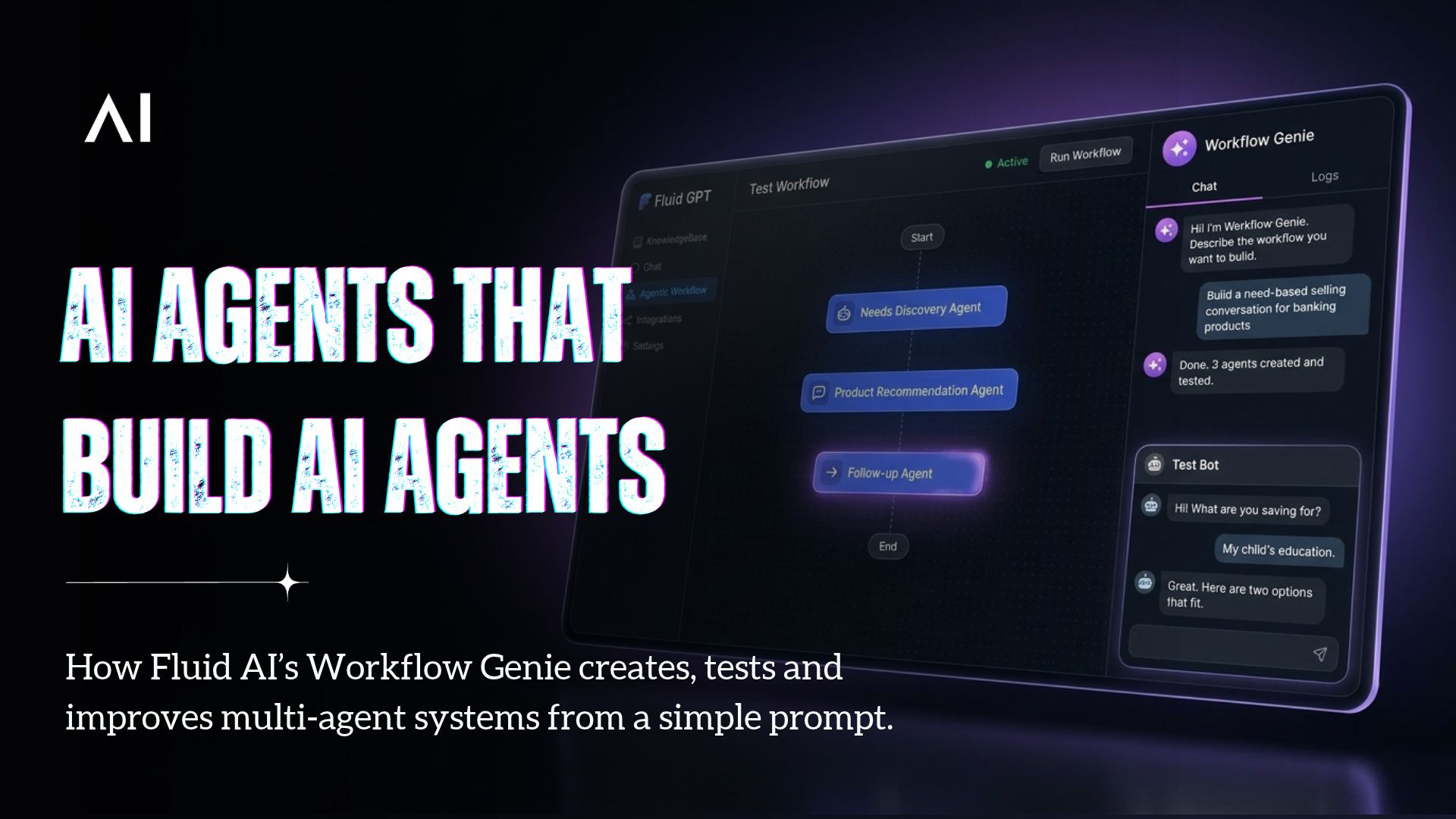
AI Agents That Build AI Agents: How Fluid AI's Workflow Genie Creates, Tests and Fixes Its Own Agents
What if building an AI agent was as simple as describing what you wanted it to do?
No flowcharts. No writing scripts. No manually connecting agents or figuring out which AI model should handle each task.
You just describe the outcome, and AI builds the system behind it.
That is the idea behind Fluid AI's Workflow Genie, an AI agent builder that can create multi-agent workflows from a simple natural-language instruction. It generates the workflow, writes the scripts, selects models, connects agents and tests the system through its own iterations.
In a recent demonstration, we showed how Genie could build a need-based banking sales conversation from a single instruction.
Let's look at how it works, what happens behind the scenes and why this approach matters for enterprises.
Why Building AI Agents Is Still Too Hard
AI agents can handle complex tasks, but building them is still difficult for most business teams.
Before an AI agent can do useful work, someone needs to define its responsibilities, design the workflow, select models, write scripts, connect different agents and test how everything works together.
Consider a bank that wants to create a need-based sales conversation. The team knows what it wants: understand a customer's requirements and recommend relevant banking products.
But turning that idea into a working multi-agent system requires technical knowledge.
Someone needs to decide how many agents are needed, what each agent should do and how they should communicate.
This creates a gap between knowing what you want AI to do and knowing how to build it.
An AI agent builder should solve this problem. Instead of making users assemble everything themselves, it should help turn their instructions into working AI systems.
What Is an AI Agent Builder?
An AI agent builder is a platform that helps users create, configure and test AI agents without building every component from scratch. It can handle agent logic, model selection, workflow creation and orchestration.
Traditional builders often require users to configure agents through visual interfaces or code.
AI-powered agent builders take another approach. Users describe what they want, and AI handles much of the work required to create the system.
Fluid AI's Workflow Genie follows this approach.
"A basic AI workflow builder connects steps. An AI agent platform like Fluid AI can create the agents themselves."
AI Agents That Build AI Agents: What Does It Mean?
AI agents that build AI agents are systems that can create other agents based on a user's instructions.
Instead of manually designing an agent architecture, users describe the outcome they want. The builder then creates the required agents, generates their workflows and connects them.
With Workflow Genie, the process goes beyond generating a workflow diagram.
It creates the workflow, writes the scripts, selects AI models, maps agent interactions and tests the agents it has created.
The important difference is that the AI does not simply help you build agents. It takes on the building process itself.
How Workflow Genie Works as an AI Agent Builder
Workflow Genie turns a plain-language instruction into a multi-agent system through four stages.
1. Prompt-to-Workflow Generation
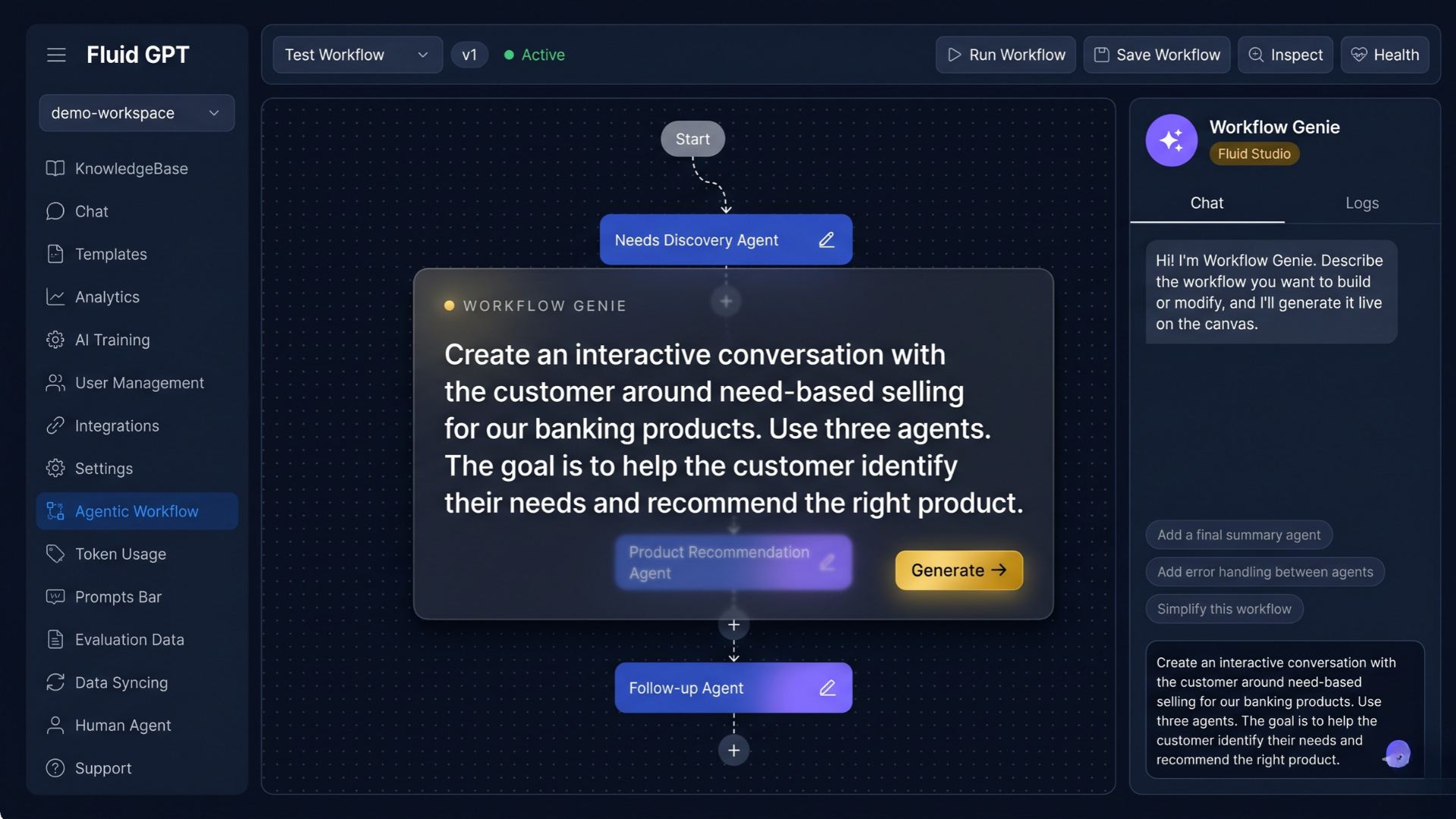
It starts with a simple instruction.
You do not need to prepare a technical specification, draw a flowchart or decide how many agents are required.
In the demonstration, Abhinav Aggarwal, co-founder of Fluid AI, explains:
"I could just ask Genie to create an interactive conversation with the customer base, selling based on kind of once."
The idea was to create a need-based selling conversation for a set of banking products.
Abhinav did not manually design the individual agents or write their instructions. He simply described the outcome he wanted.
This is important because business teams understand their problems. They should not need to understand agent architecture before they can start solving them.
2. Auto-Programming and Agent Architecture
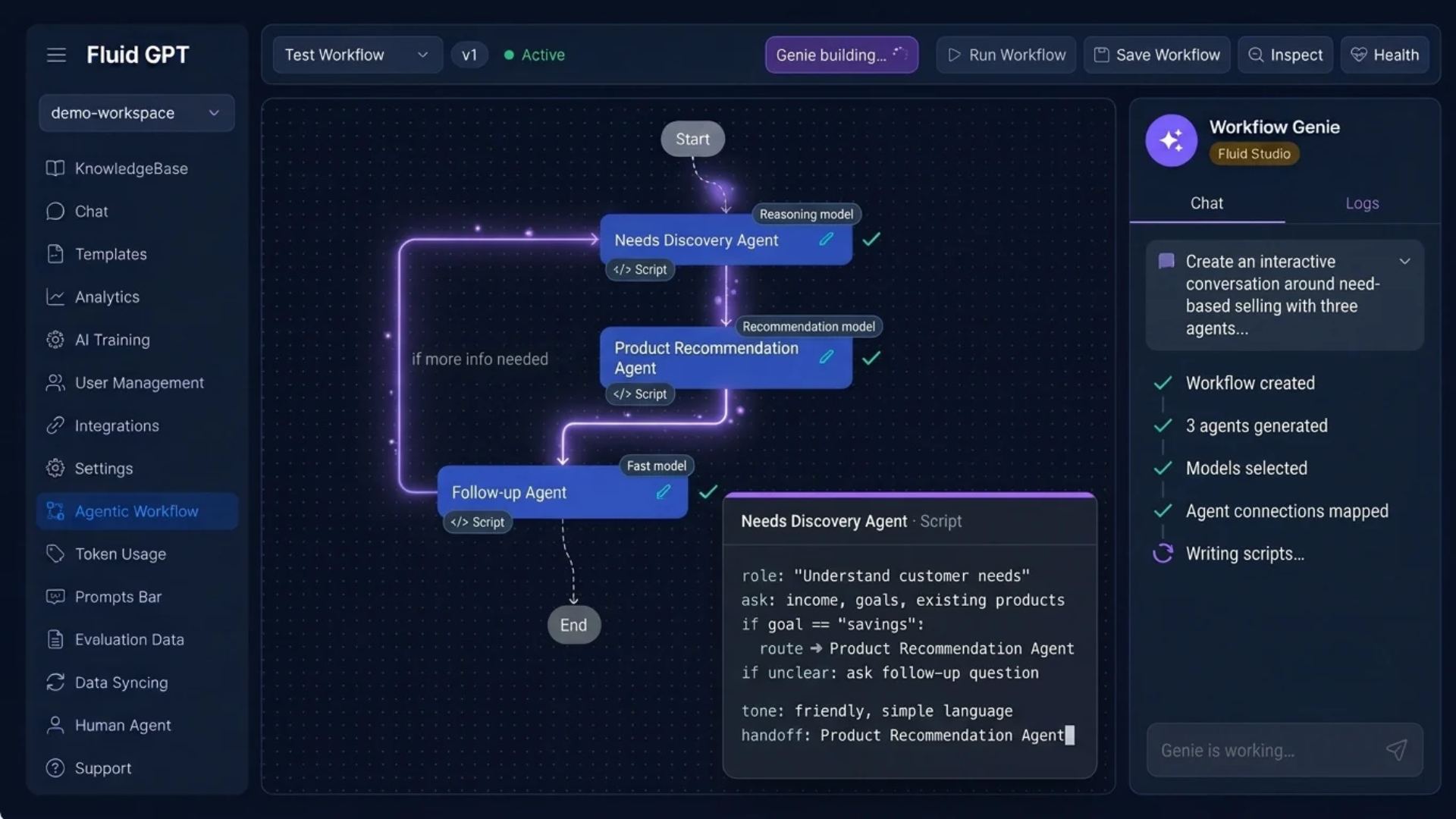
Once the instruction is given, Genie handles the underlying setup.
It generates the workflow, writes the required scripts, selects appropriate AI models and maps how different agents will connect and communicate.
Abhinav describes this process in the demonstration:
"It'll start generating the workflow and the script. It's kind of auto-programming and auto-testing."
Behind the scenes, Genie takes care of several things:
Model selection: Chooses the appropriate AI models for the workflow.
Agent connections: Determines which agent needs to communicate with which other agent.
Script generation: Creates the scripts required for the agents.
Workflow creation: Connects the different components into a multi-agent system.
Traditionally, this requires someone with knowledge of programming, model selection and workflow orchestration.
Workflow Genie takes on this work automatically.
The user describes the outcome. Genie works out the system required to achieve it.
3. Auto-Testing and Iteration
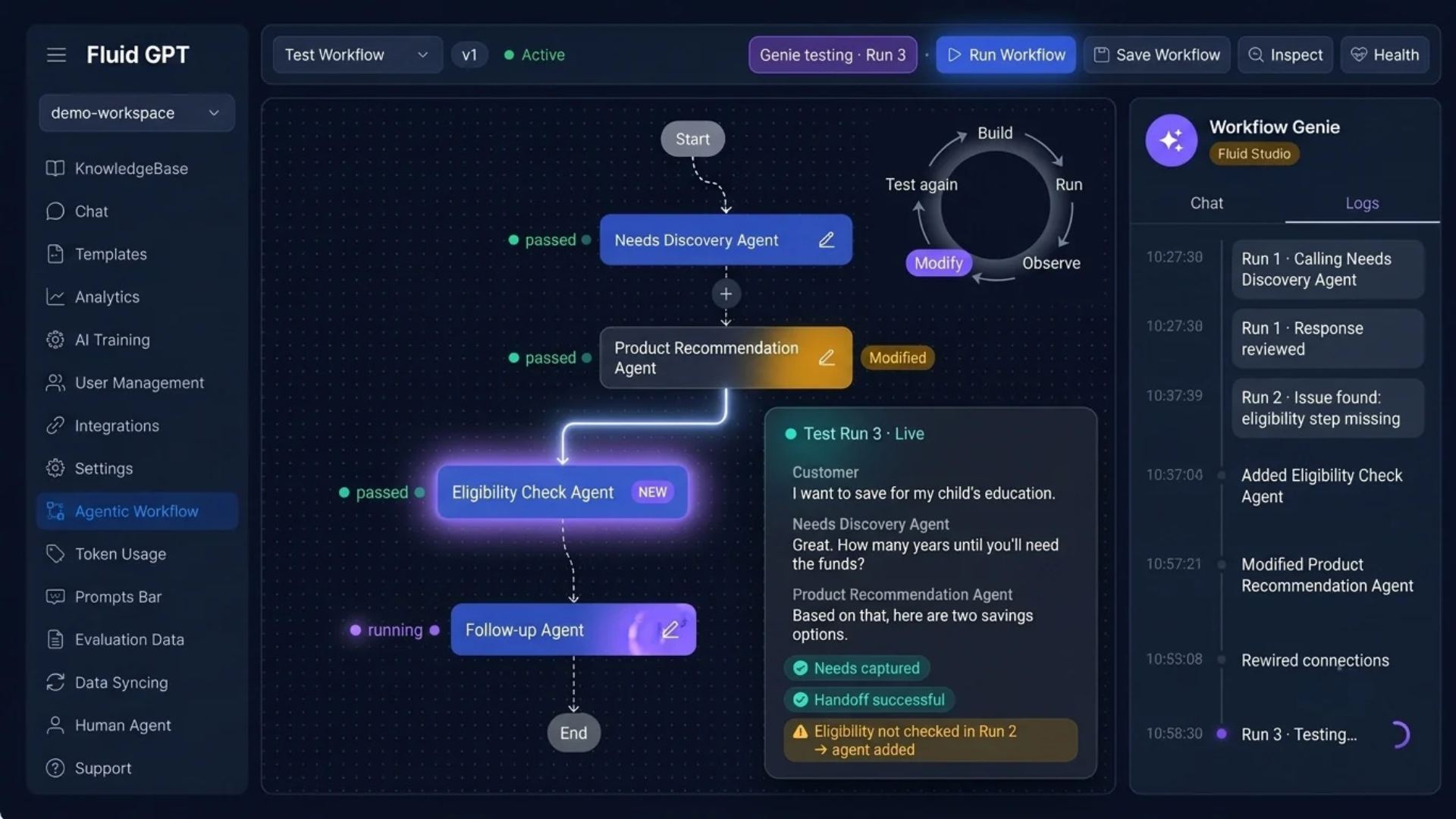
Generating agents does not automatically mean the workflow will work.
This is why Workflow Genie does not stop after creating the system.
It calls the newly created agents, runs the conversation, reads their responses and makes changes where needed.
Abhinav explains:
"It'll test it, kind of do its iterations and start working at the back."
He also demonstrates that the testing happens through actual agent interactions:
"It's actually testing, you know, it's calling the agent."
Genie can add agents, modify existing ones or rewire connections before running the workflow again.
The process looks like this:
Build → Run → Observe → Modify → Test again.
This iterative process helps Genie work towards a functioning multi-agent system rather than handing users an untested workflow. This built-in AI agent testing moves Genie closer to self improving AI agents that check their own work before handing it over.
A workflow that looks good on a screen is not necessarily one that works in practice.
4. Visibility Into Agent Conversations
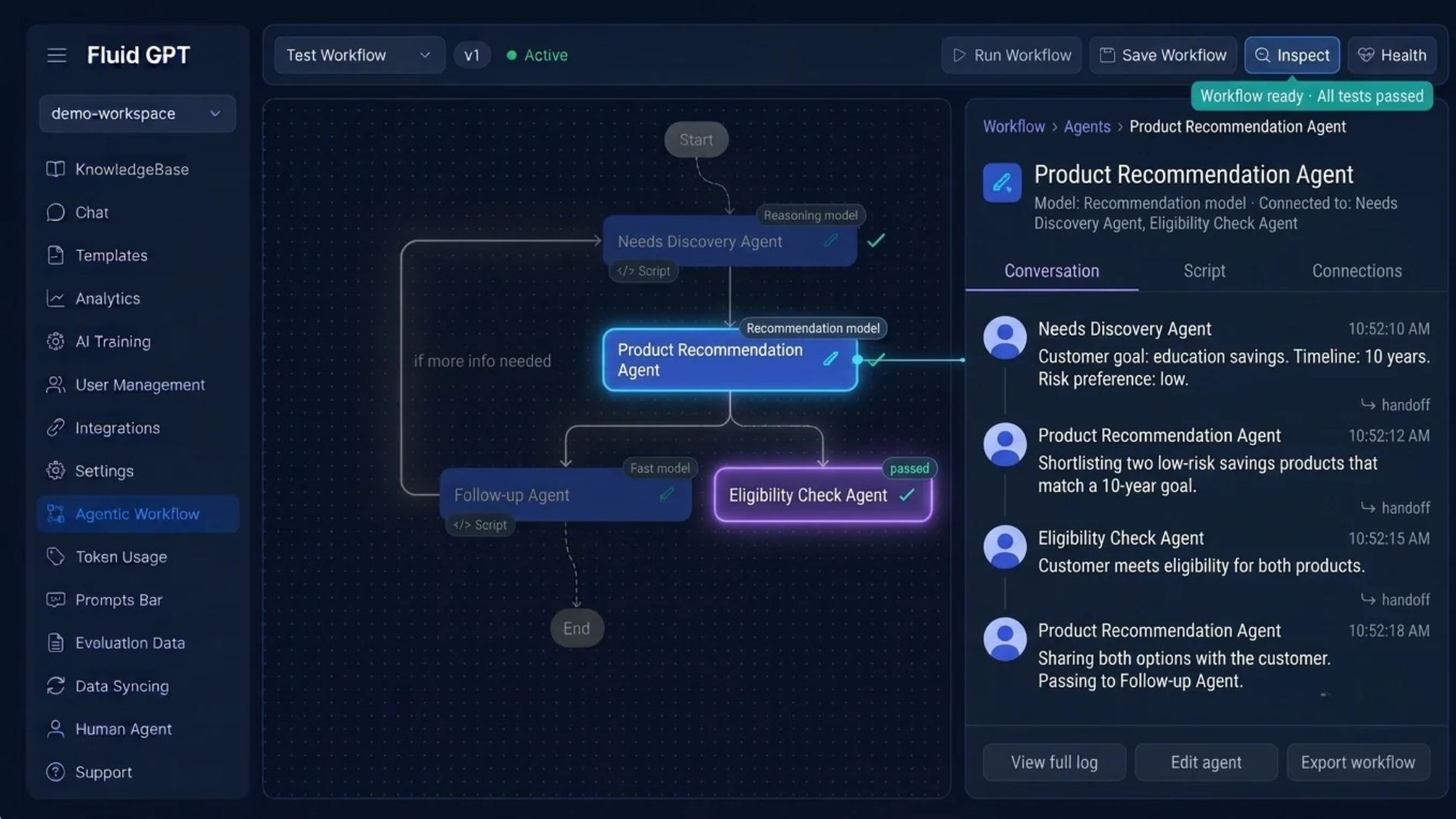
After the building and testing process, users can open individual agents and inspect the conversations happening between them.
Abhinav shows this in the demonstration:
"I can actually see my various agents that will come up and what they talk."
This is an important part of the experience.
Users are not simply told that their workflow is ready. They can see the agents Genie created and understand how they interact.
When multiple agents work together, looking only at the final output is not enough. Teams also need visibility into what happened along the way.
Traditional Agent Building vs AI Agents That Build AI Agents
Traditional agent development requires users or developers to assemble the system. AI-powered builders automate much of this process.
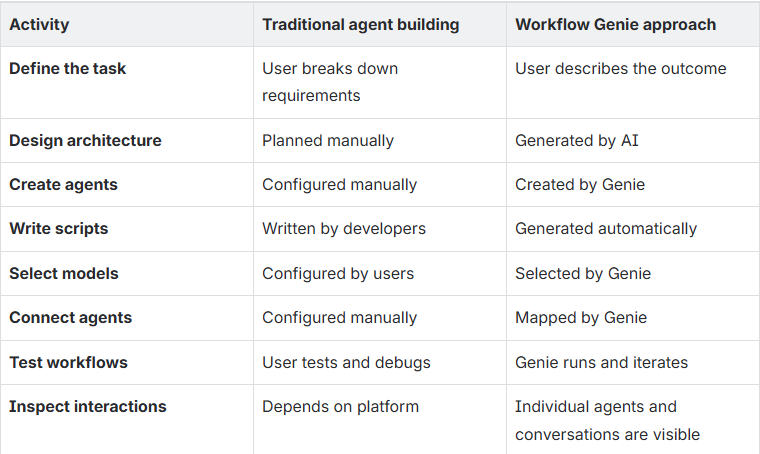
The goal is not to remove people from the process. It is to remove the technical barriers that prevent them from building what they need.
What We Learned Building an AI That Builds AI
Building an AI that creates other AI agents taught us three important things.
Self-testing matters more than one-shot generation.
We did not want Genie to generate agents and leave users to figure out what went wrong.
When several agents communicate, one agent's response can affect the next. A problem in one part of the conversation can affect the entire workflow.
That is why we built testing and iteration into the process. Genie runs its own agents, reads their responses and makes changes before handing the system back.
Visibility is non-negotiable.
When agents communicate with one another, users need to understand those interactions.
We made individual agents and their conversations accessible because enterprise teams should not have to trust a black box.
Vague prompts are the real test.
Most technical users can write detailed instructions. But we wanted to see what happens when someone describes a problem naturally, without knowing how to design the underlying system.
The user should focus on the problem, not the technical language required to solve it.
Why a No-Code AI Agent Builder Matters for Regulated Enterprises
For banks, insurers and other regulated organisations, an AI agent builder must offer more than convenience. Businesses also need to consider visibility, ownership, security and deployment.
We regularly hear questions like these in conversations with financial institutions.
"If we leave, do we keep our workflows?"
Workflows should not become inaccessible when a business changes platforms. Fluid AI workflows can be exported, and their code is visible. Agents created by Genie can also be opened and inspected.
"Commercials are not a challenge if the output is tangible."
Enterprise buyers want to see working outcomes, not just impressive demonstrations. This is why self-testing matters. Genie runs its agents and iterates on the workflow rather than stopping at generation.
"Who owns the model when we leave?" and "Can this run air-gapped?"
These questions reflect the need for infrastructure control. Fluid AI supports on-premise deployment, allowing organisations to run AI on their own infrastructure.
Another concern comes from business teams that want to experiment but lack deep AI knowledge.
A partner once told us he was afraid of sounding uninformed in front of a bank CIO while discussing AI.
This is where no-code AI agent builders matter. People who understand business processes should be able to explore AI workflows without first becoming experts in programming or agent architecture.
Accessibility and enterprise governance need to work together.
Use Cases for AI Agents That Build AI Agents
Workflow Genie can help teams create multi-agent systems for different business workflows. Workflow Genie turns plain-language goals into agentic workflows across banking, insurance and internal operations.
1. Banking Sales Conversations
Banks can explore need-based sales conversations that understand customer requirements and guide interactions around relevant banking products.
This was the use case demonstrated by Abhinav Aggarwal. He described the desired conversation, and Genie created the multi-agent workflow, tested the interactions and iterated on the system.
2. Insurance Servicing
Insurance teams handle customer questions, claims-related interactions and policy servicing requests.
An AI agent builder can help teams describe these processes and create multi-agent workflows around them.
Genie can generate and test the underlying agent structure, giving teams a starting point they can inspect.
3. Internal Business Workflows
Enterprise teams manage processes involving multiple steps, information sources and business requirements.
Instead of manually creating every agent and connection, teams can describe the workflow they want to build.
Genie then generates the agents, connects them and tests their interactions.
These are potential applications of the workflow-building approach, rather than claims of existing deployments for each process.
How to Create an AI Agent with Workflow Genie
Creating an AI agent with Workflow Genie starts with describing the task.
Describe the task: Write a plain-language instruction explaining what you want the multi-agent system to accomplish.
Generate the workflow: Genie creates the workflow, writes scripts, selects models and maps agent connections.
Run the agents: Genie calls its newly created agents and runs through their interactions.
Test and iterate: Genie reads the responses, modifies or rewires agents and runs the workflow again.
Inspect the system: Open individual agents and review the conversations taking place between them.
You describe the outcome. Genie handles the building and testing process.
Frequently Asked Questions (FAQs)
1. What AI platforms are built around the concept of AI agents instead of static flows?
AI agent platforms allow agents to work through tasks, interact with other agents and participate in multi-step workflows. Fluid AI is an enterprise agentic AI platform, and Workflow Genie creates and tests multi-agent workflows from plain-language instructions.
2. What platforms help us improve AI agents over time based on real-world feedback loops?
Platforms that support testing, iteration and agent interaction reviews can help teams improve their workflows. Fluid AI's Workflow Genie runs its newly created agents, reads their responses and iterates by adding, modifying or rewiring agents. This automated building process is distinct from continuous feedback collection from live users.
3. Which AI providers make it easy for our internal teams to experiment and iterate safely?
Enterprise AI platforms with accessible building tools, visibility and deployment controls can make experimentation easier. Fluid AI's Workflow Genie lets teams create workflows using natural-language instructions, while Fluid AI also supports on-premise deployment.
4. What AI platforms are strong at orchestrating complex, multi-step business workflows?
Platforms with multi-agent orchestration capabilities can coordinate different agents across business processes. Fluid AI's Workflow Genie generates workflows, selects models, creates scripts and maps agent interactions before testing and iterating on the system.
5. Which AI platforms excel at real-time adaptation to new scenarios without explicit rules?
AI platforms that accept outcome-based instructions can make it easier to explore new scenarios without manually defining every workflow step. Fluid AI's Workflow Genie generates and iterates on multi-agent workflows based on natural-language instructions. This should not be confused with unrestricted real-time adaptation of deployed agents.
6. What platforms can help us create AI agents that can talk to customers, look up records, and complete actions?
Enterprise agentic AI platforms can support customer conversations, information retrieval and business actions, depending on their integrations and configuration. Fluid AI helps enterprises build agentic workflows, while Workflow Genie creates multi-agent systems from plain-language descriptions, including conversational workflows such as banking sales interactions.
Conclusion: What If an AI Agent Builder Could Build Its Own Agents?
For a long time, building AI agents meant understanding how to build them before you could even start.
You needed to know the models, the scripts, the architecture and how different agents should communicate. That made experimentation difficult for teams that understood the business problem but did not have the technical expertise to build the solution.
Workflow Genie changes where that process starts.
You describe what you want. Genie creates the workflow, writes the scripts, selects models, connects agents, tests their interactions and iterates on the system. And you can inspect the agents it has created.
This is what AI agents that build AI agents look like in practice.
For enterprises looking for an AI agent platform that removes the technical barrier to agentic workflows, this is where it starts.
Want to see the entire process for yourself?
Watch Workflow Genie in action to see how a simple instruction becomes a working multi-agent workflow.
And if your team is exploring how to build AI agents for real enterprise workflows, book a demo with Fluid AI to see how we are approaching it.