What Is Enterprise Search? AI Search, Use Cases and Solutions

TL;DR
Enterprise search lets employees find information across internal documents, apps and databases from one place, limited to what each person is allowed to see.
Enterprise AI search goes beyond file lists. It understands plain-language questions and uses RAG to answer from your documents, with citations you can verify.
Hybrid search works best: keyword search for exact codes and names, semantic search for natural questions.
Look for source citations, OCR for scanned files, access controls, the right connectors and on-premise options. Test with real employee questions, not demos.
Fluid AI offers cited AI document search for regulated industries. It’s ISO 27001 and SOC 2 Type II certified, with on-premise deployment.
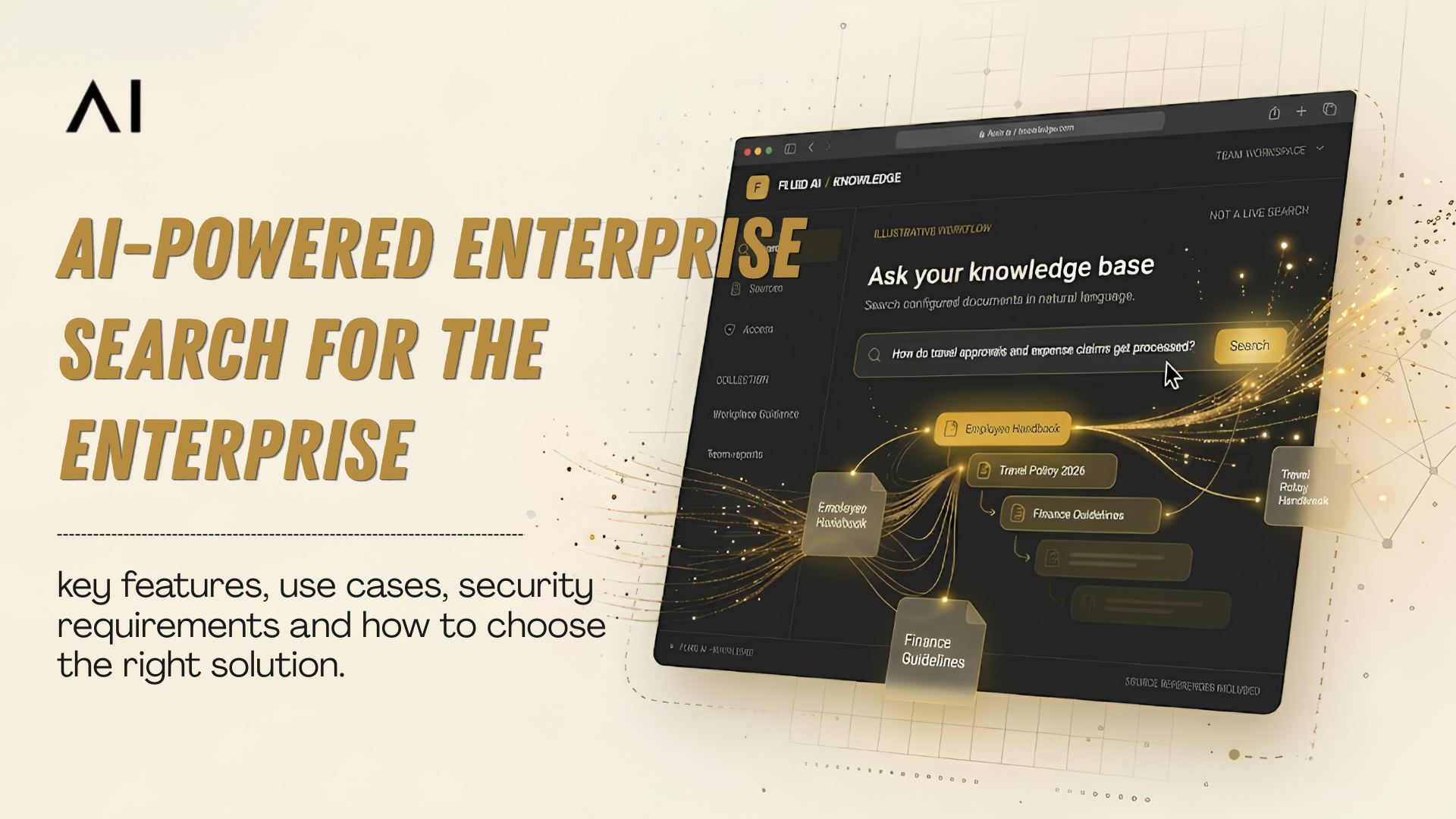
The information your team needs is probably already somewhere in your organization. It might be in a policy document, a maintenance report, a spreadsheet or an email from three years ago.
Finding it can take longer than using it.
Enterprise search helps employees find information across their organization's internal systems from one place. With AI, it can go beyond finding files. Employees can ask questions in plain language and get answers based on relevant documents, with references that help them verify the information.
For organizations with large document archives, complex operations and strict security requirements, this can change how people access and use company knowledge.
In this guide, we'll explain what enterprise search is, how it works, the different types of enterprise search, its business applications and what to look for when choosing an enterprise search solution.
What Is Enterprise Search?
Enterprise search is technology that allows employees to search for information across an organization's internal documents, applications, databases and knowledge repositories through a single interface.
Unlike public web search, enterprise search works with information that an organization has made available to the system. Access should be controlled so users can retrieve only the information they are authorized to see.
For example, an employee at an oil refinery might need a specific operating procedure before carrying out maintenance. Instead of searching through folders and opening multiple PDF files, they could ask:
What is the shutdown procedure for Unit 4?
An AI-powered enterprise search solution can retrieve relevant passages from the connected documents and present an answer with references to the source material.
Traditional enterprise search primarily returns links to documents. Modern AI-powered enterprise search can also interpret questions, retrieve relevant information and generate a direct answer based on that information.
Why Do Organizations Need Enterprise Search?
Most organizations have information spread across different systems. Policies may sit in SharePoint, financial information in ERP systems, customer records in CRM software and technical documents in separate repositories.
Employees often need to move between these systems to answer a single question.
This creates several problems.
Information is scattered. Employees need to know where a document is stored before they can find it.
Search terms do not always match. The words an employee uses may differ from the language used in the original document.
Large archives take time to search. Finding one relevant detail may mean reviewing several long documents.
Knowledge gets difficult to reuse. Important information from previous projects can remain buried in reports and records.
Finding information does not always provide an answer. Employees still have to read documents, compare details and work out what applies to their situation.
Enterprise search brings connected information within easier reach. AI-powered enterprise search takes this further by helping employees find relevant information and understand what it says.
How Does Enterprise Search Work?
An enterprise search system typically follows a process that collects information, prepares it for retrieval and returns relevant results when someone asks a question.
1. Connect to internal information sources
The system connects to the repositories selected by the organization. These might include document management systems, internal websites, databases and business applications.
Connectors and APIs help make information from different sources available for search.
The sources that can be connected depend on the search platform, the available integrations and the organization's deployment requirements.
2. Extract and index information
The system processes the collected content and organizes it into a searchable index.
This can include extracting text and metadata from documents so that the search engine can retrieve relevant information without having to examine every file from scratch for each query.
Scanned documents need additional processing. Optical character recognition (OCR) converts text in scanned pages and images into machine-readable text, allowing that content to become searchable.
3. Understand the user's query
When an employee enters a query, the search system identifies what information might be relevant.
Traditional systems rely heavily on matching words. AI-powered systems can also use natural language processing and semantic representations to identify information related to the meaning of a question.
For example, a search for employee travel reimbursement may need to find a policy that uses the phrase business travel expense claims.
4. Retrieve relevant information
The system searches the available index or connected repositories and returns information that matches the query.
The quality of the results depends on factors such as the source data, indexing, retrieval method, document freshness and relevance ranking.
5. Generate an answer and show the sources
In AI-powered enterprise search, a language model can use the retrieved information to compose a direct response.
When the system supports source citations, employees can open the referenced documents and check the information before relying on it.
This distinction matters. A fluent answer is not necessarily a correct answer. The underlying evidence must be relevant, and users need a way to verify it.
What Are the Different Types of Enterprise Search?
Enterprise search can use different architectures and retrieval methods. The right approach depends on the organization's data, security requirements and the kind of results employees need.
Siloed search
Siloed search operates within individual repositories. Employees may need to search each system separately to find information.
This can work for a small collection of documents but becomes less convenient when information is spread across many systems.
Federated search
Federated search sends a query to multiple systems and combines the results in one interface.
The information can remain in its original repositories, but the quality and format of the results depend on the search capabilities of those systems and how the results are combined.
Unified search
Unified search brings selected information from multiple sources into a common searchable index or retrieval layer.
This can provide a more consistent search experience across repositories. It also requires careful attention to indexing, data updates and access permissions.
AI-powered enterprise search
AI-powered enterprise search uses techniques such as natural language processing, semantic retrieval and language models to improve how people find and understand information.
Instead of returning only a list of documents, it can generate answers from retrieved content.
These approaches are not mutually exclusive. An enterprise search platform can combine multiple retrieval methods and AI capabilities.
Keyword Search vs. Semantic Search vs. Hybrid Search
Not every search query should be handled in the same way.
Keyword search is useful when someone knows the exact name, phrase, code or identifier they need. Semantic search helps when the query expresses an idea rather than the exact wording found in a document.
Hybrid search combines different retrieval methods to improve the chances of finding relevant information.
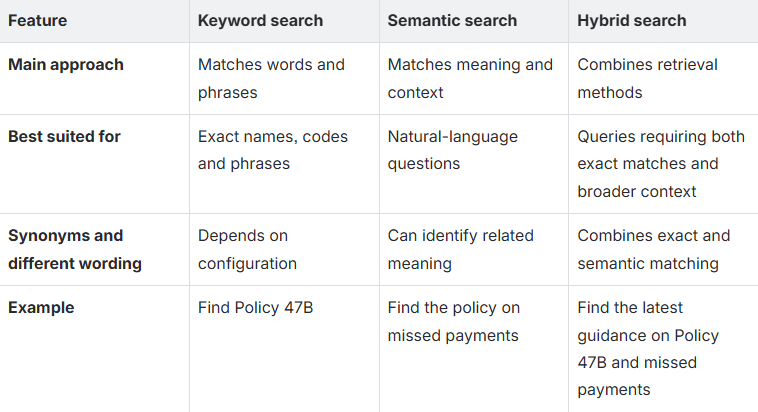
For example, an engineer searching for a specific equipment code needs an exact match. Someone asking how to troubleshoot a machine needs relevant technical guidance, even if the document uses different wording.
A well-designed enterprise search solution should be evaluated against the actual questions employees ask, rather than assuming that one retrieval method will work equally well for every task.
How Does AI-Powered Enterprise Search Use RAG?
Retrieval-augmented generation (RAG) is an approach that combines information retrieval with a language model.
Instead of relying only on information learned during training, the model receives relevant content retrieved from an external knowledge source. It then uses that content to generate a response.
A typical RAG-based enterprise search workflow has four steps:
Ask: An employee asks a question in natural language.
Retrieve: The system searches connected sources and identifies relevant passages.
Generate: A language model uses those passages to prepare an answer.
Verify: The employee follows the source references to check the information.
Consider a question such as:
What does our maintenance procedure require before restarting this equipment?
The system can retrieve the relevant procedure and use its contents to formulate an answer. The employee can then review the cited procedure before taking action.
RAG can help ground AI responses in company information, but it does not guarantee accuracy. Incorrect source documents, incomplete retrieval, outdated information and poorly generated answers can still cause problems.
That is why source quality, retrieval quality, access controls and verification matter as much as the language model itself.
What Is the Difference Between Enterprise Search and an AI Chatbot?
Enterprise search and AI chatbots serve different purposes, although they can work together.
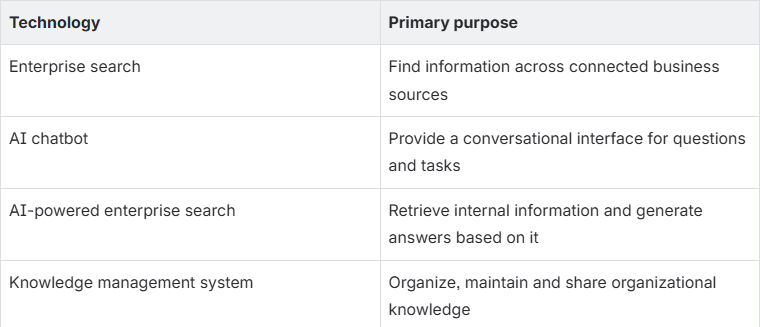
An AI chatbot may answer general questions without accessing company documents. An enterprise search system can provide the internal information needed to answer questions about company policies, procedures or records.
When an AI chatbot connects to enterprise search, it can use retrieved company information to provide more relevant answers.
The important distinction is not whether the interface looks like a search bar or a chat window. It is whether the system can retrieve the right information, respect permissions and provide evidence for its answers.
What Are the Key Features of Enterprise Search Software?
Enterprise search solutions differ in their capabilities. Before choosing one, consider the following features.
Natural-language search
Employees should be able to ask questions in everyday language instead of knowing exact filenames or technical search syntax.
Multiple document formats
Check whether the platform supports the file types your organization uses, including PDFs, Word documents, spreadsheets and images.
If your archive contains scanned records, verify whether OCR is available and how well it works on your actual documents.
Source citations
AI-generated answers should provide references that let employees find and review the original information.
Check whether citations point to useful locations, such as a specific page or section, rather than only linking to a large document.
Connectors and integrations
The solution should support the repositories and applications your teams rely on. Check which connectors are available, how frequently data is refreshed and how integration is maintained.
Access controls
Enterprise search must be designed around the organization's permissions and security policies. Verify how document-level permissions are applied to search results and generated answers.
Relevance and freshness
A search result is not useful if it is irrelevant or outdated. Test how the platform handles similar documents, duplicate content, recently updated policies and exact identifiers.
Multilingual search
For organizations operating across regions, evaluate how well the system handles the languages employees use and the languages in which documents are written.
Deployment flexibility
Some organizations can use cloud-based services, while others require private cloud or on-premise deployment because of security, regulatory or infrastructure requirements.
The right choice depends on where data is processed, how it is protected and what the organization's policies allow.
Enterprise Search Use Cases Across Industries
Enterprise search is especially useful when employees need to retrieve specific information from large collections of internal documents.
The applications vary by industry, but the underlying requirement is similar: make existing information easier to find and verify.
Banking and financial services
Banks maintain policies, internal circulars, product documentation, compliance material and operational procedures.
Enterprise search can help employees locate relevant guidance, compare internal documents and prepare for reviews. Source references are particularly useful when a response needs to be checked against an approved policy.
Insurance
Insurance teams work with policy documents, claims records, underwriting guidelines and supporting paperwork.
AI-powered document search can help employees locate relevant clauses and supporting information across connected documents. The accuracy and completeness of the retrieved material remain important, especially when decisions require human review.
Oil and gas
Refineries and other industrial operations maintain standard operating procedures (SOPs), maintenance logs, engineering documents and technical manuals.
Finding the correct procedure quickly can help engineers spend less time navigating document archives and more time working on operational problems.
Fluid AI in practice: Fluid AI's Oil & Gas Operations and Refinery solution describes Smart Refinery AI, which supports natural-language search across SOPs, maintenance logs and technical drawings. The page reports a 6 TB engineering archive indexed and 90% faster document retrieval.
This illustrates how enterprise search can support document-heavy industrial work. The reported results should be understood in the context of that specific deployment.
Manufacturing
Manufacturing teams rely on equipment manuals, quality reports, maintenance records and production documentation.
Enterprise search can help teams retrieve relevant instructions and historical records when investigating equipment issues, reviewing quality problems or preparing maintenance work.
Government and public sector
Government organizations often maintain large collections of circulars, regulations, forms, scanned records and departmental documents.
AI document search can help employees locate relevant material across connected archives. Access controls and source verification remain essential when handling sensitive information or official guidance.
What Are the Challenges of Enterprise Search?
Enterprise search can make information easier to access, but the results depend on how the system is implemented and maintained.
Fragmented data
Information may be spread across applications, shared drives and legacy systems. A search solution cannot retrieve information from sources it cannot access.
What to check: Confirm which repositories can be connected and identify any important sources that remain outside the search scope.
Poor document quality
Scanned pages, inconsistent formatting, duplicate files and missing metadata can affect retrieval quality.
What to check: Test document extraction and OCR using representative files from your own archives.
Irrelevant or outdated results
A system may return documents that contain the right words but do not answer the question. Older versions of policies can also cause confusion.
What to check: Test relevance, document versioning and how updates reach the search index.
AI-generated errors
A language model can misinterpret retrieved information or generate an answer that the source material does not support.
What to check: Test answers against known documents and verify whether citations support the claims made in the response.
Security and access permissions
Making internal information easier to find must not mean making it available to everyone.
What to check: Verify how the system enforces access permissions during retrieval and answer generation, including when permissions change.
Adoption and usability
Even a technically capable search platform may provide limited value if employees do not trust its results or find it difficult to use.
What to check: Test it with real employee questions and measure whether it helps people complete their work more effectively.
How to Choose the Right Enterprise Search Solution
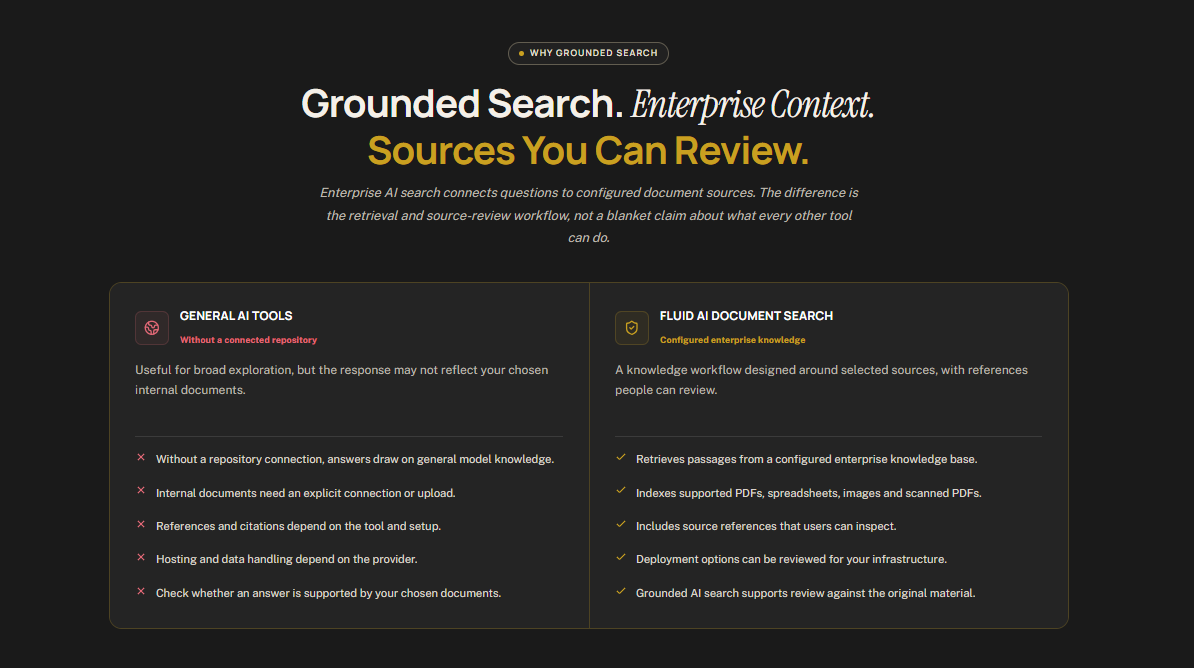
Choosing an enterprise search platform starts with understanding the information employees need and the problems they face today.
Use the following checklist when evaluating solutions.
Identify the sources. List the document repositories, applications and databases that need to be searchable.
Collect real questions. Gather common questions from employees instead of relying only on prepared demonstrations.
Test retrieval quality. Check whether the system finds the right documents and relevant passages.
Verify answers. Confirm that generated responses accurately reflect the source material and provide useful citations.
Check permissions. Test whether users can access only the information permitted by organizational policy.
Evaluate document handling. Test PDFs, spreadsheets, scanned files and other important formats.
Review deployment requirements. Understand where data is processed, how it is stored and what security controls are available.
Measure business impact. Compare the time needed to answer common questions before and after deployment.
Useful metrics include time to find an answer, retrieval relevance, answer verification time, unsuccessful search rates and employee adoption.
A focused evaluation using real documents and real questions will provide more useful evidence than a demonstration using only ideal examples.
Enterprise Search Trends: From Finding Documents to AI Agents
Enterprise search is increasingly becoming part of broader AI systems.
Three developments are particularly important.
From document lists to direct answers
Traditional search returns documents that employees must read themselves. AI-powered search can use retrieved content to prepare a direct response, while allowing employees to review the sources.
From isolated repositories to connected knowledge
Organizations are working to make information across different systems more accessible. Better connections and retrieval can help reduce the effort involved in navigating separate repositories.
From search to AI-assisted work
Search can provide the context an AI assistant or agent needs to complete a task. For example, an AI system may retrieve a procedure before preparing a summary or gathering information for a review.
However, retrieving information is not the same as authorizing an action. Workflows that affect business systems or operational decisions need appropriate permissions, controls and human oversight.
How Fluid AI Approaches Enterprise Search
Fluid AI provides enterprise AI solutions for organizations that need to work with internal knowledge, documents and business systems.
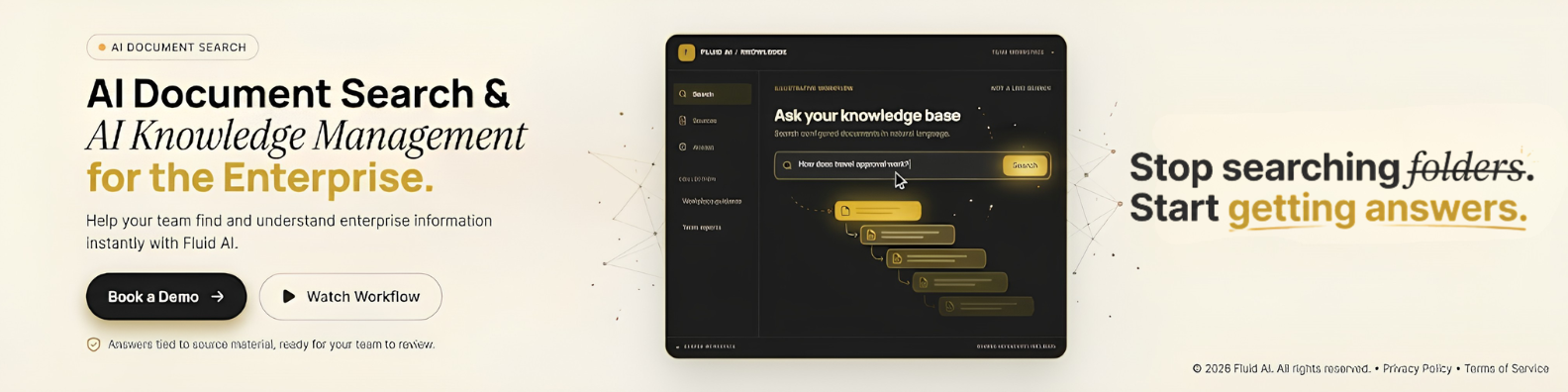
Its AI Document Search & Knowledge Management solution focuses on making information across enterprise documents easier to find and use.
Key capabilities described on the solution page include:
Natural-language document search: Ask questions across connected documents without needing to know the exact filename or wording.
Source-grounded answers: Retrieve information and review the source material behind an answer.
OCR for scanned documents: Make information in supported scanned PDFs searchable.
Knowledge across document collections: Work with supported PDFs, spreadsheets and images through a configured knowledge base.
Deployment suited to enterprise requirements: Plan source connections, access controls and deployment options around the organization's environment.
For regulated and document-heavy industries, the aim is to make existing organizational knowledge more accessible without losing sight of source verification and security.
Fluid AI also applies AI to specific industry workflows. Its refinery operations solution, for example, describes natural-language retrieval across engineering archives, SOPs and maintenance records.
Enterprise search can therefore serve as a starting point for broader enterprise AI applications. Employees first need to find the right information. AI systems can then use that information to support additional work, subject to the appropriate controls.
Want to see how AI document search could work with your organization's information? Explore Fluid AI's AI Document Search & Knowledge Management solution.
Frequently Asked Questions
What is enterprise search in simple terms?
Enterprise search helps employees find information across an organization's internal documents, applications and knowledge repositories from one place.
What is the difference between enterprise search and web search?
Web search helps people find publicly available information across the internet. Enterprise search focuses on an organization's connected internal information and must account for access permissions.
What is AI-powered enterprise search?
AI-powered enterprise search uses techniques such as natural-language processing, semantic retrieval and language models to help people find information and generate answers based on retrieved content.
What is the difference between keyword search and semantic search?
Keyword search matches words and phrases. Semantic search looks for information related to the meaning of a query. Hybrid search combines retrieval methods to handle both exact terms and broader questions.
How does RAG improve enterprise search?
Retrieval-augmented generation gives a language model relevant information retrieved from external sources, such as internal documents. This helps ground generated answers in the available material, although it does not guarantee accuracy.
Can enterprise search work with scanned PDFs?
Yes, if the solution supports OCR. OCR extracts machine-readable text from scanned pages so the content can be indexed and searched. Results depend on document quality and OCR performance.
Is enterprise search secure?
Security depends on the platform's architecture and configuration. Organizations should verify access controls, document permissions, data processing, deployment requirements and the ability to check source material.
How do you measure enterprise search performance?
Organizations can measure retrieval relevance, time to find information, answer accuracy, verification time, unsuccessful searches and employee adoption.
What should you look for in enterprise search software?
Look for relevant source integrations, effective document processing, useful retrieval, source citations, access controls, appropriate deployment options and measurable performance on real employee questions.
Can enterprise search support AI agents?
Yes. Enterprise search can supply information that AI assistants and agents use as context. Any actions performed using that information should follow the organization's security policies and approval requirements.
Make your organization's knowledge easier to find.
Explore Fluid AI's AI Document Search & Knowledge Management solution to learn how AI can help employees retrieve information across enterprise documents and work with answers grounded in source material.
_1790254083168-CB8e8KXC.png)