Help Desk Software: Features, Benefits, Types & How to Choose the Right Solution

TL;DR
Help desk software helps businesses manage, track and resolve customer and employee support requests from one place.
A helpdesk ticketing system organises incoming queries into tickets, assigns them to the right teams and tracks their resolution.
Common features include ticket management, automated routing, multi-channel support, knowledge bases, reporting and integrations.
AI-powered help desk software can understand queries, suggest responses, retrieve information and automate repetitive support tasks.
The right solution depends on your business size, support requirements, existing systems, security needs and automation goals.
What Is Help Desk Software?
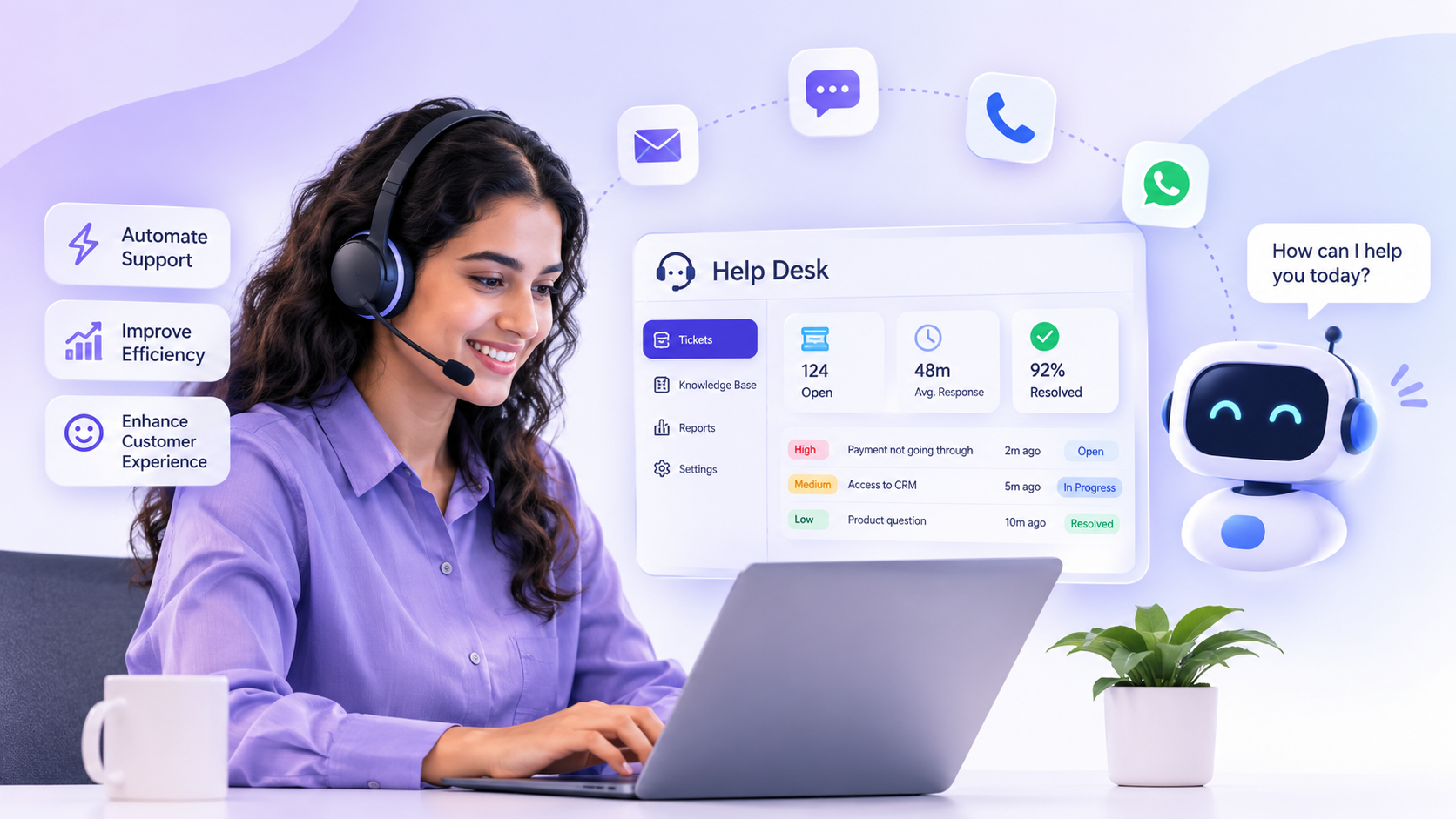
Help desk software is a platform that helps businesses receive, organise, track and resolve support requests from customers or employees.
Instead of managing requests through separate emails, phone calls, spreadsheets and messaging platforms, businesses can use one central system to handle support operations.
A typical help desk platform allows teams to:
Create and manage support tickets.
Assign requests to the right team or agent.
Track the status of each issue.
Maintain customer and employee interaction history.
Share answers through a knowledge base.
Monitor response and resolution times.
Generate reports on support performance.
For example, when a customer contacts a bank about a failed transaction, the help desk system can record the complaint, create a ticket, assign it to the relevant team and track the issue until it is resolved.
This gives support teams a clear view of every request and reduces the chances of queries being missed.
Modern help desk software solutions are also moving beyond basic ticket management. AI-powered platforms can understand requests, retrieve information and automate parts of the support process.
How Does Help Desk Software Work?
Most help desk software follows a structured process to manage incoming support requests.
Here's how it typically works:
1. A Support Request Is Received
A customer or employee raises a query through an available channel, such as email, phone, live chat, a website form or messaging platform.
2. A Ticket Is Created
The system records the request as a ticket. It may include details such as the customer's information, issue category, priority and time of submission.
3. The Request Is Categorised and Assigned
The ticket is classified and assigned to the appropriate support team or agent based on predefined rules.
For example, a payment-related query may go to the finance support team, while a technical issue may be assigned to IT.
4. The Support Team Works on the Issue
The assigned agent reviews the request, checks the relevant information and works towards resolving the problem.
5. The Ticket Is Resolved and Closed
Once the issue is addressed, the agent updates the ticket and marks it as resolved or closed.
6. Performance Is Monitored
Managers can use reports to track ticket volumes, response times, resolution rates and unresolved requests.
AI-powered help desk systems can add another layer to this process by understanding incoming requests, suggesting answers and automating selected tasks.
Key Features of Help Desk Software
The features available in help desk software vary by provider. However, most business solutions include a few essential capabilities.
1. Ticket Management
Ticket management is one of the most important help desk software features.
It allows teams to record support requests, assign ownership, set priorities and track progress until resolution.
A good ticketing system should also help teams identify overdue requests, monitor pending issues and maintain a complete history of each interaction.
2. Multi-Channel Support
Customers and employees may contact support through different channels.
Some prefer email, while others use phone calls, live chat, messaging platforms or website forms.
Multi-channel support brings these interactions into a central system so agents can manage requests without constantly switching between applications.
3. Automated Ticket Routing
Manually assigning every support request can slow down operations.
Automated ticket routing uses predefined rules to send requests to the right team based on factors such as issue type, priority, department or customer category.
This helps reduce manual coordination and ensures requests reach the appropriate people.
4. Knowledge Base Management
A knowledge base stores useful information such as FAQs, troubleshooting guides, product documentation and internal procedures.
Support agents can search this information to find answers quickly. Customers can also use self-service resources to resolve common issues without contacting support.
5. Reporting and Analytics
Help desk software should provide visibility into support performance.
Common metrics include:
First response time.
Average resolution time.
Number of open and closed tickets.
Ticket volume by category.
Customer satisfaction scores.
SLA compliance.
These reports help managers identify bottlenecks, understand recurring issues and improve support operations.
6. Integration With Existing Business Systems
A help desk platform becomes more useful when it connects with the systems a business already uses.
Integrations with CRM platforms, ERP systems, databases and communication tools allow support teams to access relevant information without switching between multiple applications.
This is especially important for large organisations where customer and operational information is spread across different systems.
7. Security and Access Controls
Support requests can contain personal, financial or confidential business information.
Help desk software should provide appropriate security capabilities, including authentication, role-based access, audit logs and data protection controls.
Businesses should also evaluate deployment options and compliance requirements before selecting a platform.
8. AI-Powered Automation
Traditional help desk software mainly helps teams organise and manage requests.
AI-powered help desk software can go further by understanding queries, retrieving information and supporting selected tasks.
Depending on the platform, AI capabilities may include:
Classifying and prioritising incoming requests.
Suggesting relevant responses.
Summarising customer conversations.
Handling routine queries through chat or voice.
Supporting ticket routing and follow-ups.
Escalating complex cases to human agents.
The goal is to reduce repetitive work while helping support teams resolve requests more efficiently.
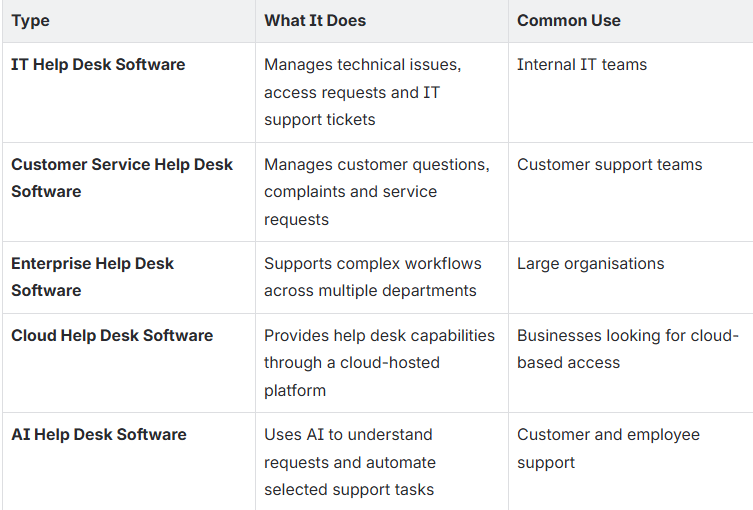
Types of Help Desk Software
Not every organisation has the same support requirements. Some need to manage customer complaints, while others need to handle internal IT requests or employee queries.
Here are the common types of help desk software.
IT Help Desk Software
IT help desk software helps internal IT teams manage technical support requests.
Common examples include password resets, software installation issues, system access requests, hardware problems and network-related queries.
It helps IT departments track incidents, assign tickets and monitor resolution progress.
Customer Service Help Desk Software
Customer service help desk software focuses on managing queries and requests from customers.
It can bring together interactions from email, phone, chat and other communication channels.
Teams can use it to handle product questions, billing issues, complaints, service requests and follow-ups.
Enterprise Help Desk Software
Enterprise help desk software is designed for organisations with larger teams, multiple departments and more complex support requirements.
These platforms may need to support:
Multiple business units and locations.
Advanced ticket routing and approval workflows.
Integration with enterprise CRM and ERP systems.
Role-based access and audit trails.
Large volumes of support requests.
Custom reporting and automation.
Cloud Help Desk Software
Cloud help desk software is hosted on cloud infrastructure and accessed through the internet.
Businesses typically do not need to manage the underlying infrastructure themselves. However, they should still evaluate data storage, access controls, integrations, security and deployment requirements before choosing a provider.
Benefits of Help Desk Software
A well-implemented help desk solution can improve more than just ticket management. It can make support operations easier to manage and more consistent.
1. Faster Response and Resolution Times
Automated ticket creation, categorisation and routing reduce manual coordination.
Support requests can reach the right teams faster, helping agents spend more time resolving issues.
2. Better Customer Experience
Customers want clear answers without having to repeat the same information to multiple agents.
A centralised help desk gives support teams access to interaction history and request details, making it easier to provide consistent responses.
3. Improved Team Productivity
Support teams often spend a significant amount of time on repetitive administrative work.
Automation can help with ticket assignment, status updates, routine responses and follow-ups, allowing agents to focus on more complex requests.
4. Better Visibility Into Support Operations
Managers can track open requests, team workloads, response times and unresolved issues from one place.
This makes it easier to identify bottlenecks and understand where additional support may be needed.
5. Consistent Support Across Channels
When customer interactions are managed through a connected system, teams can maintain a more consistent support experience across email, voice, chat and messaging platforms.
6. Easier Scalability
As a business grows, its support requirements usually grow as well.
Help desk software makes it easier to manage increasing request volumes through structured workflows, automation and centralised ticket management.
7. Better Decision-Making
Reports and analytics help businesses understand common customer issues, recurring technical problems and areas where support processes need improvement.
This information can help teams make better decisions about staffing, training and process changes.
Help Desk vs Service Desk: What's the Difference?
The terms help desk and service desk are often used interchangeably, but they do not mean exactly the same thing.
A help desk generally focuses on resolving user issues and support requests. A service desk has a broader role, often covering IT service management and the complete lifecycle of IT services.
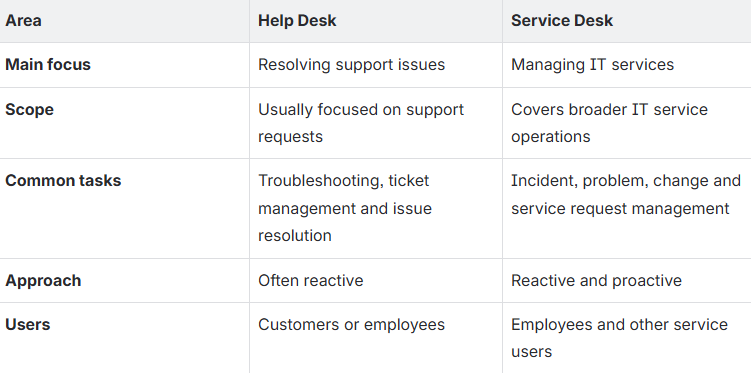
For example, an IT help desk may resolve an employee's password reset request.
A service desk may manage the wider process, including access management, incident tracking, service changes and IT service delivery.
The right choice depends on the organisation's operational requirements.
Traditional Help Desk vs AI-Powered Help Desk Software
Traditional help desk platforms help support teams organise and manage requests. AI-powered platforms can also understand the content of those requests and support parts of the resolution process.
Here's how they differ.
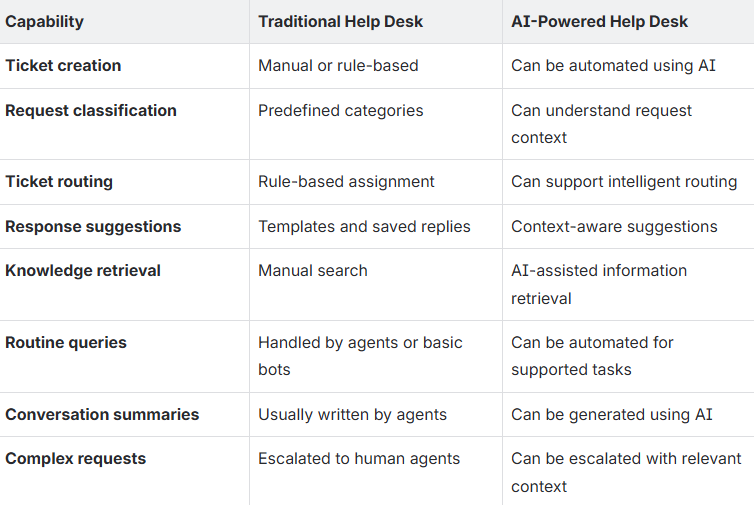
AI does not automatically make every support process better. Its effectiveness depends on the quality of the underlying information, integrations, permissions and escalation rules.
For business-critical processes, human review should remain available wherever judgement or approval is required.
How AI Agents Are Transforming Help Desk Automation
AI-powered help desk software is evolving beyond basic chatbots and automated ticket assignment.
AI agents can understand requests, retrieve information from connected systems and perform defined tasks within approved permissions.
This changes how organisations approach help desk automation.
Consider an employee who cannot access an internal business application.
In a traditional process, the employee raises a ticket, waits for an IT agent to review it and then explains the issue.
An AI-powered workflow could:
Understand the employee's request through chat or voice.
Identify the application and access issue.
Retrieve relevant troubleshooting information from the company's knowledge base.
Check permitted information from connected systems.
Perform an authorised action if the workflow allows it.
Escalate the issue to an IT team if human intervention is needed.
The same approach can support customer service workflows, including query handling, account-related requests and follow-ups.
What Is an AI Ticketing System?
An AI ticketing system uses artificial intelligence to support different stages of ticket management.
It can help classify incoming requests, identify their intent, suggest responses, prioritise tickets and route them to the right team.
Some systems also use AI agents to handle routine requests or perform actions through connected business applications.
The level of automation depends on the system's capabilities, integrations and access permissions.
What Is a Conversational AI Help Desk?
A conversational AI help desk allows users to interact with support systems through natural language instead of navigating forms or searching through multiple help articles.
Users can ask questions through chat or voice and receive relevant information based on the system's knowledge and connected data sources.
For example, a customer could ask about a payment status or an employee could request help with an internal application.
The AI system can understand the request, retrieve relevant information and provide a response. If it cannot resolve the issue, it can pass the conversation to a human agent.
What Is IT Service Desk Automation?
IT service desk automation uses software and AI to reduce manual work across IT support processes.
Examples include:
Password reset workflows.
Software access requests.
Ticket classification and routing.
IT troubleshooting assistance.
Incident summaries.
Employee support queries.
With AI agents, organisations can also connect support workflows to internal applications and perform selected actions within defined access controls.
How to Choose the Best Help Desk Software
Choosing the best help desk software is not just about comparing feature lists. It is about finding a platform that fits your organisation's support requirements and existing workflows.
Here are some important factors to consider.
1. Identify Your Support Requirements
Start by understanding the types of requests your teams handle.
Are you managing customer complaints, internal IT issues, employee queries or all three?
The answer will help you identify whether you need customer service help desk software, IT help desk software or an enterprise-wide solution.
2. Evaluate the Core Features
Check whether the platform offers the features your team actually needs.
These may include ticket management, automated routing, multi-channel support, knowledge base management, reporting and integrations.
Avoid paying for features that do not support your business requirements.
3. Check Integration Capabilities
Your help desk platform should work with the systems your organisation already uses.
Look for integrations with CRM platforms, ERP systems, internal databases, communication tools and other business applications.
For enterprises, the ability to connect with existing systems can be just as important as the ticketing features.
4. Review AI and Automation Capabilities
If automation is a priority, look beyond basic chatbot functionality.
Check whether the platform can understand requests, retrieve company information, suggest responses and support workflows across connected applications.
Also evaluate how it handles requests that require human judgement.
5. Consider Security and Compliance
Support systems may process sensitive customer, employee and business information.
Evaluate authentication, role-based access, audit logging, data protection, deployment options and compliance requirements.
Organisations in regulated industries should pay particular attention to where data is processed and stored.
6. Evaluate Scalability
A solution that works for a small team may not be suitable for an organisation with multiple departments and high support volumes.
Check whether the platform can support additional users, locations, channels, integrations and workflows as your business grows.
7. Compare the Total Cost
Do not compare platforms based only on their subscription price.
Consider implementation, integrations, customisation, maintenance, additional users, automation usage and ongoing support.
The best solution is one that delivers value against your actual support requirements.
How Fluid AI Helps Businesses Move Beyond Traditional Help Desk Software
Traditional help desk software helps businesses manage support tickets, assign requests and track resolutions. But many support requests involve more than simply creating a ticket.
An employee may need access to an application. A customer may want to check a transaction. An IT team may need to troubleshoot an issue across multiple systems.
These tasks often require information from different business applications and several steps before they can be resolved.
This is where AI agents can make a difference.
Fluid AI helps enterprises move beyond basic ticket management by deploying AI agents that can understand requests, retrieve information and execute workflows across connected business systems.
With Fluid AI, organisations can:
Automate IT help desk requests: Support workflows such as password resets, access provisioning, IT troubleshooting and ticket routing.
Handle employee queries: Answer questions about HR policies, leave, payroll, benefits and internal processes using company knowledge.
Support customer service: Manage customer queries across voice, chat, email and WhatsApp.
Connect existing systems: Integrate with platforms such as ServiceNow, Jira, Zendesk, Freshdesk, CRM and ERP systems.
Automate multi-step workflows: Retrieve information, trigger approved actions and escalate requests when human intervention is required.
From Answering Questions to Resolving Requests
Consider an employee who cannot access an internal application.
Instead of simply creating a support ticket, a Fluid AI agent can understand the issue, retrieve relevant troubleshooting information, check connected systems and support an authorised access workflow. If the issue needs human attention, it can escalate the request with the relevant context.
Fluid AI agents can operate across existing enterprise systems rather than requiring businesses to replace their current infrastructure.
The platform also supports cloud, private cloud, hybrid and on-premise deployments, with enterprise security, governance and auditability capabilities.
For organisations looking to bring AI into their customer support and IT operations, this creates an opportunity to move from managing support queues to resolving more requests through intelligent automation.
Explore Fluid AI's enterprise AI platform to learn more.
Frequently Asked Questions About Help Desk Software
1. What is help desk software used for?
Help desk software is used to manage and resolve customer or employee support requests. It helps businesses create tickets, assign issues, track progress, communicate with users and monitor support performance.
2. What are the benefits of help desk software?
The main benefits include faster response times, better ticket management, improved team productivity, consistent customer support, centralised request tracking and better visibility into support operations.
3. What features should help desk software have?
Important help desk software features include ticket management, automated routing, multi-channel support, knowledge base management, reporting, integrations, security controls and automation capabilities.
4. What is the difference between help desk and service desk software?
Help desk software primarily focuses on resolving support requests and user issues. Service desk software covers a broader range of IT service management activities, including incident management, service requests and change management.
5. What is an AI help desk?
An AI help desk uses artificial intelligence to understand support requests, retrieve information, suggest responses and automate selected support tasks. Some platforms also use AI agents to interact with connected business systems.
Final Thoughts
Help desk software has become an important part of how businesses manage customer and employee support.
But as support volumes increase and business processes become more complex, simply creating and assigning tickets may not be enough.
Organisations need solutions that connect support channels with company knowledge, existing business systems and intelligent automation.
AI-powered help desk solutions and AI agents can help businesses move beyond basic ticket management and automate more of the support process.
The goal is not just to manage more requests. It is to resolve them more efficiently while keeping the right people involved when human judgement is needed.