The AI Employee Assistant That Cites Every Answer, for Branch, HR, and IT

TL;DR
Frontline bank tellers lose real time on every complex customer query hunting through 400-page policy PDFs, intranet wikis, and compliance manuals. That friction inflates handle time, grows lobby queues, and creates compliance risk when staff guess policy details under pressure.
A line-cited AI policy assistant lets branch staff ask a question in plain language and get an instant answer linked to the exact clause in your own documents. Combined with zero-hallucination RAG, Active Directory security, and automatic audit logging, it cuts branch handle time while keeping every answer traceable and compliant. The same platform doubles as an AI HR helpdesk and IT helpdesk, so one assistant serves branch, HR, and IT support.
The policy hunt: banking's hidden branch bottleneck
Walk into almost any bank branch and you will see the same friction. A customer asks a straightforward but non-routine question about account documentation, wire limits, or international KYC rules. The representative pauses, opens an internal portal, types a keyword, and gets a list of a dozen 100-page PDF manuals. They open three files, hit Ctrl+F, scan dense legal text, then lean over to ask a senior colleague, all while the customer waits.
A single complex query handled this way can take several minutes to resolve manually. A line-cited AI assistant returns a verified, sourced answer in seconds. The gap between those two experiences is the opportunity.
This is not an employee performance problem. It is a structural knowledge-retrieval problem, and it is solvable.
The business impact of policy search friction
Inflated average handle time (AHT). Searching unorganized documentation adds minutes to every complex interaction, and those minutes compound across thousands of daily queries.
Lobby queue bottlenecks. Longer handling times mean longer lines during peak hours, which drags down customer satisfaction.
Inconsistent service. Tellers across branches interpret long manuals differently, producing inconsistent advice and operational errors.
Compliance and audit risk. Under pressure to clear a queue, staff sometimes rely on memory or a colleague's guess. If that guidance is outdated, the bank is exposed during audits.
Slow onboarding. New tellers spend weeks just learning where operational rules live across scattered department portals.
Why intranets and search portals fail at this
Most banks have already tried central intranets or shared drives. They fall short for three predictable reasons.
Keyword-match failure. Standard search needs exact keyword matches. Search "identity document verification schedule" when the manual says "Customer Due Diligence Intervals" and you get zero results.
Outdated local copies. To dodge slow portals, staff save PDFs to their desktops and quietly rely on rules that miss the latest regulatory circulars.
Information overload. Traditional search returns a list of files, not an answer. The employee still has to open each one and find the paragraph while the customer waits.
How line-cited AI policy lookup works
Unlike public consumer AI tools that generate answers from the open internet, an enterprise banking assistant is anchored strictly to your bank's official documentation. The pipeline runs in four secure steps.
Single Sign-On (SSO) authentication. The system verifies employee identity and checks Role-Based Access Control (RBAC) permissions before accepting the query.
Secure internal retrieval. The engine performs semantic search across bank-approved manuals, SOPs, and compliance circulars, so it understands intent, not just keywords.
Cited answer generation. The assistant returns a concise answer with the exact document name, section, and page link attached.
Zero-hallucination fallback and audit logging. If the answer is not in the documents, the assistant says so, and every query is written to an immutable audit record.
This is what "zero-hallucination RAG for banking" means in practice: retrieval grounded in your own files, with a hard stop when the source is silent.
The pillars of an enterprise banking policy AI
Every answer traced to the exact line. Ask "What are the KYC update timelines by customer risk category?" and the assistant answers, then cites the source, for example: Operational Policy Manual, Section 38(a), Page 14. One click opens the clause to verify.
Zero-hallucination safeguards. In banking, a wrong answer is worse than no answer. When a policy is silent, the assistant returns a fallback such as: "This query is not covered in current policy documents. Please escalate to your branch compliance officer."
Identity and role-based access. A junior teller should not see executive compensation guidelines or confidential risk metrics. By integrating with Active Directory and SSO, the assistant filters every result by the logged-in user's role.
One assistant, three roles: branch, HR, and IT
A branch employee changes hats through the day. Deploying separate tools for each creates clutter. A unified employee assistant adapts across three modes.
HR helpdesk mode. Staff check leave balances, benefits, and expense rules in plain language. A conversational AI HR helpdesk answers "What is the travel expense submission window?" by pulling the exact line from the HR handbook, instead of routing a ticket. This is where an HR helpdesk chatbot replaces slow HR helpdesk ticketing systems for routine policy questions.
IT helpdesk mode. Staff reset passwords, unlock system accounts, and request access. IT helpdesk automation resolves routine requests through an identity-verified workflow rather than a queue. An IT helpdesk chatbot handling first-line requests is often the fastest ROI, because password and access tickets are high-volume and repetitive.
Branch support mode. Frontline staff look up KYC rules, fee waivers, and loan documentation requirements, each answer sourced to the operational manual.
One platform, three functions. Deploy one capability or all three.
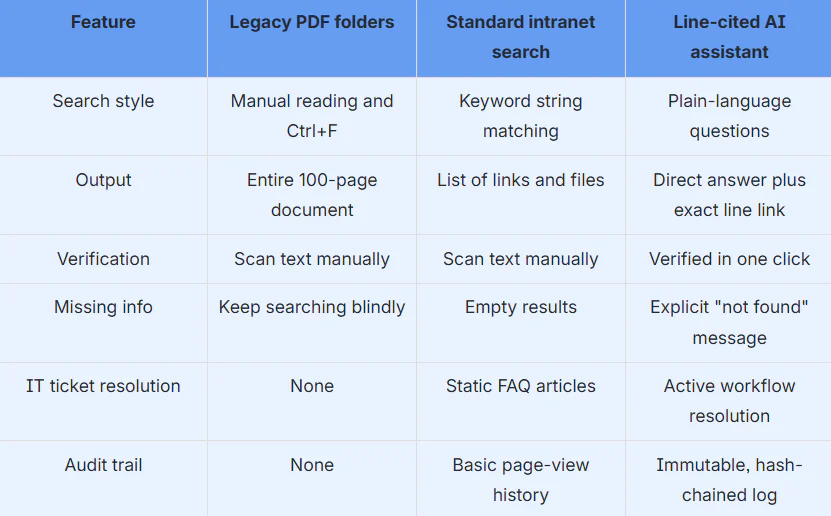
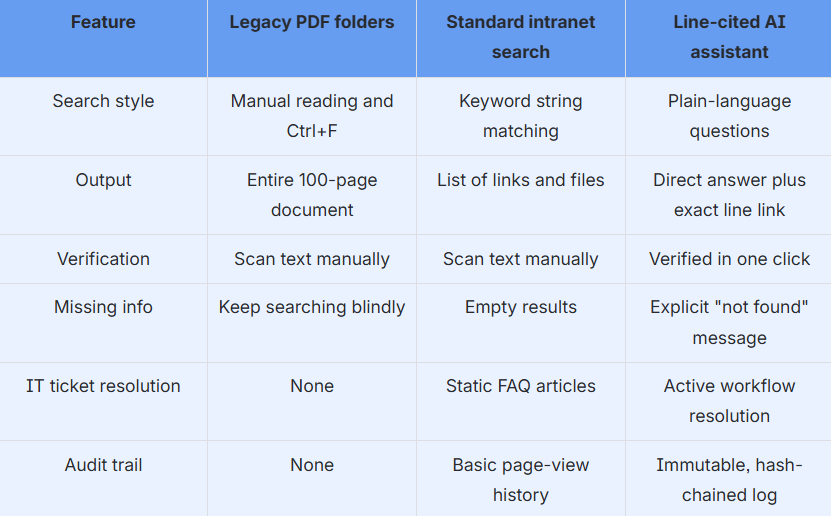
Legacy systems vs line-cited AI
Real-world branch scenarios
Complex regulatory compliance. A customer requests an unusually large international wire. Old way: the teller digs through an AML handbook while the customer waits. AI way: the teller asks "International wire verification requirements over the reporting threshold" and gets the steps instantly, cited to the AML policy section.
Instant IT auto-resolution. A teller's account locks during a busy shift. Old way: call the IT helpdesk and wait on hold. AI way: open the assistant, select "reset password," verify identity, and get back to work in under a minute.
Deployment checklist: is your bank ready?
Accuracy and citations
Every answer links to the exact line and section of the source
The AI searches only internal, approved documents, never the open web
Strict fallback rules prevent guessing when policy is silent
Security and data privacy
Integrates with Active Directory and enterprise SSO
Supports on-premise or private-cloud deployment, keeping data inside the perimeter
RBAC limits results by user credentials
Compliance and audit
Every interaction logged immutably with long-term retention
Admins can track unanswerable queries to find policy gaps
Employees can flag ambiguous answers for compliance review
Reinvent branch operations with Fluid AI
The Fluid AI Employee Assistant gives branch staff instant, auditable answers backed by your own documentation:
Verifiable answers. Every response links to the exact page and paragraph in your real policy manuals.
HR and IT auto-resolution. Resolve routine internal helpdesk requests automatically.
Sovereign deployment. Keep sensitive guidelines inside your secure data center, air-gapped if required.
Audit-ready logs. Hash-chained audit logs with long-term retention protect you during regulatory reviews.
Schedule a live Branch Employee Assistant demo → Book a demo
Frequently asked questions
1. How does the AI assistant prevent incorrect policy answers?
It uses a grounded retrieval framework that reads only the official policy documents your compliance team uploads. If a document does not contain the answer, the system states that the information is missing rather than generating a guess, which prevents hallucinated answers.
2. What is a line-cited AI policy assistant?
It is an enterprise AI tool that answers employee questions in plain language and attaches the exact source, the document name, section, and page, to every answer, so the response can be verified in one click against the bank's real policy manuals.
3. Can branch employees override or flag AI responses?
Yes. Every response includes a feedback option. If a policy has changed or an answer looks incomplete, the employee flags it, and the query, cited document, and feedback route automatically to the compliance team
4. What document formats can the assistant read?
PDF policy manuals, Word files, HTML intranet pages, SOP guides, scanned regulatory circulars, and compliance spreadsheets.
5. Does it work as an HR and IT helpdesk too?
Yes. The same assistant runs as a conversational AI HR helpdesk for leave, benefits, and expense queries, and as an IT helpdesk for password resets, account unlocks, and access requests, so one platform covers branch, HR, and IT support.
6. Can it be deployed on-premise for data security?
Yes. It runs entirely within your data center or private cloud, integrates with Active Directory, and is air-gapped ready, so employee and policy data never leave your perimeter.