Tired of Creating Documents Manually? Use Fluid AI to Do It Faster

TL;DR
Creating documents manually can take hours of reading, writing, formatting, and checking information. An AI document generator helps businesses automate these tasks and create documents faster. From drafting business reports and office notes to summarising PDFs, translating files, and preparing presentations, AI can simplify everyday office work. This guide explains how AI document generation works, its key benefits, common business use cases, and how to choose the right tool. It also explores how Fluid AI helps businesses streamline document drafting and automate repetitive office tasks.
Tired of Creating Documents Manually? Here's How AI Can Help
Businesses create documents every day. Employees prepare reports, write office notes, summarise PDFs, draft letters, and create presentations.
But preparing these documents takes time. Employees often need to collect information from different files, organise it, check the details, and format the final document.
An AI document generator helps make this work faster. It uses artificial intelligence to create, organise, summarise, and improve documents based on user instructions and available information.
Businesses can use AI document generators to reduce repetitive work, improve productivity, and help employees prepare documents more efficiently.
In this guide, we explain what an AI document generator is, how it works, its benefits, common business use cases, and how to choose the right solution for your organisation.
What Is an AI Document Generator?
An AI document generator is a tool that uses artificial intelligence to create or edit documents from instructions, existing files, or other information.
Instead of writing every document from scratch, employees can provide the required information and explain what they need.
The AI tool can then help prepare a first draft.
For example, an employee may need to prepare an office note using an invoice, an approval letter, and a company policy.
An AI document generator can help bring the relevant information together and organise it into a structured draft.
Businesses can use AI document generators to create:
Office notes and internal memos
Letters and emails
Project updates
Business proposals
Document summaries
Translated documents
The exact capabilities depend on the AI tool being used.
How Does an AI Document Generator Work?
An AI document generator uses your instructions and available information to prepare a document.
The process usually involves five steps.
1. Provide the Instructions
First, explain what document you need.
For example, you can ask the AI to prepare a project report, summarise a policy, or draft an internal memo.
Clear instructions help the AI understand the required output.
2. Add the Source Documents
Provide the information needed to prepare the document.
This may include PDFs, reports, spreadsheets, existing templates, or other business files.
Some enterprise AI tools can also retrieve information from connected company systems, depending on their configuration.
3. Let the AI Organise the Information
The AI reviews the available information and identifies the details needed for the task.
It can help summarise content, organise key points, and arrange information into a suitable structure.
For business-critical documents, employees should check that important details are supported by the original sources.
4. Generate the Document
The AI prepares a draft based on the instructions and information provided.
Depending on the tool, it may create a structured report, office note, letter, presentation, or another document.
5. Review and Finalise
An employee reviews the draft, checks the facts, makes any necessary changes, and approves the final document.
This is especially important for financial reports, legal documents, compliance records, and official business communications.
The main benefit is simple: AI helps with the preparation work, while employees remain responsible for checking and approving the final output.
Why Do Businesses Need AI Document Automation?
Document creation involves more than writing.
Employees often spend time finding information, reading multiple files, copying details, checking numbers, formatting content, and making revisions.
When these tasks happen repeatedly, they can take time away from more important work.
AI document automation helps businesses reduce this repetitive effort.
Here are some common problems it can help address.
- Too Much Time Spent on Manual Work
Employees may need to read several documents before they can prepare a single report or memo.
AI can help summarise the source material and prepare a first draft, reducing the amount of manual preparation required.
- Information Spread Across Different Files
Important information may be stored in PDFs, spreadsheets, reports, and internal documents.
AI tools can help bring relevant information together when the files are provided or the required sources are connected.
- Repeated Document Creation
Many business documents follow a similar structure.
Examples include weekly reports, project updates, internal memos, and meeting summaries.
AI can help prepare these documents using consistent instructions and templates.
- Difficult Document Formatting
Employees may spend time arranging headings, sections, tables, and supporting information.
AI tools with document-formatting capabilities can help organise content into a more usable structure.
- Delays in Preparing Business Documents
When documents depend on information from several teams, preparation can take longer.
AI can help organise the available material and create an initial draft for review.
However, the actual time saved depends on the complexity of the document, the quality of the source information, and the level of human review required.
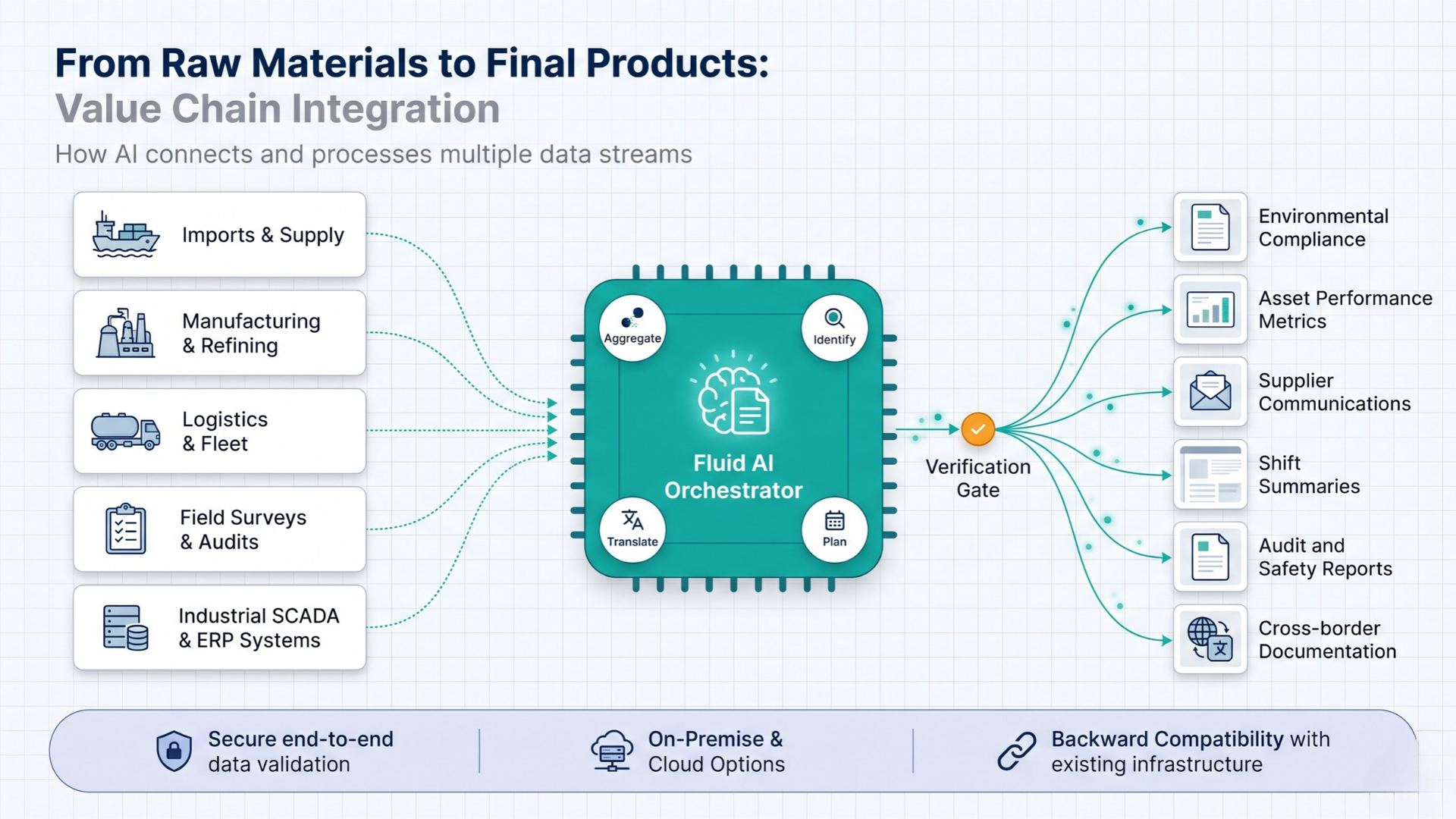
What Documents Can an AI Document Generator Create?
AI document generators support different tasks depending on their features.
The following are common examples of how businesses can use them.
1. Business Reports
Businesses prepare reports to track projects, review performance, and share updates.
An AI document generator can help turn source information into a structured report with headings, summaries, and key findings.
For example, a project manager could provide project updates and ask the AI to prepare a progress report for management.
2. Office Notes and Internal Memos
Employees often need to prepare office notes for approvals, decisions, and internal communication.
These documents may require information from invoices, policies, approval letters, and other supporting files.
AI can help organise the information into sections such as background, supporting details, observations, and recommendations.
Employees must verify the facts and ensure the draft follows the organisation's approval process.
3. Meeting Summaries
Meetings produce decisions, discussion points, and action items that need to be documented.
AI can help turn meeting transcripts or notes into structured summaries.
These summaries can include key decisions, assigned tasks, deadlines, and follow-up actions.
4. Business Letters and Emails
Businesses regularly prepare customer letters, internal announcements, formal emails, and other communications.
AI can help create a first draft based on the intended message, audience, and preferred tone.
Employees can then review the wording before sending it.
5. Proposals and Business Documents
Sales, procurement, and business development teams often prepare proposals using information from multiple sources.
AI can help organise the requirements, summarise relevant information, and prepare an initial draft.
The final document should be checked against the actual requirements and approved templates.
6. Presentations
Employees frequently turn reports and long documents into presentations.
AI tools that support presentation creation can help convert key information into slides with headings, summaries, and supporting points.
This can reduce the manual effort involved in preparing a first version of a presentation.
7. Document Summaries
Long reports, policies, and PDFs can take time to review.
AI can help summarise lengthy documents and highlight important points.
Employees can use these summaries to understand the content more quickly, while referring to the original documents when exact wording or details matter.
8. Document Translation
Businesses working across different regions may need to translate documents into other languages.
AI can help translate content and prepare a draft in the required language.
Important business, legal, and technical translations should be checked for accuracy and context before use.
What Are the Benefits of Using an AI Document Generator?
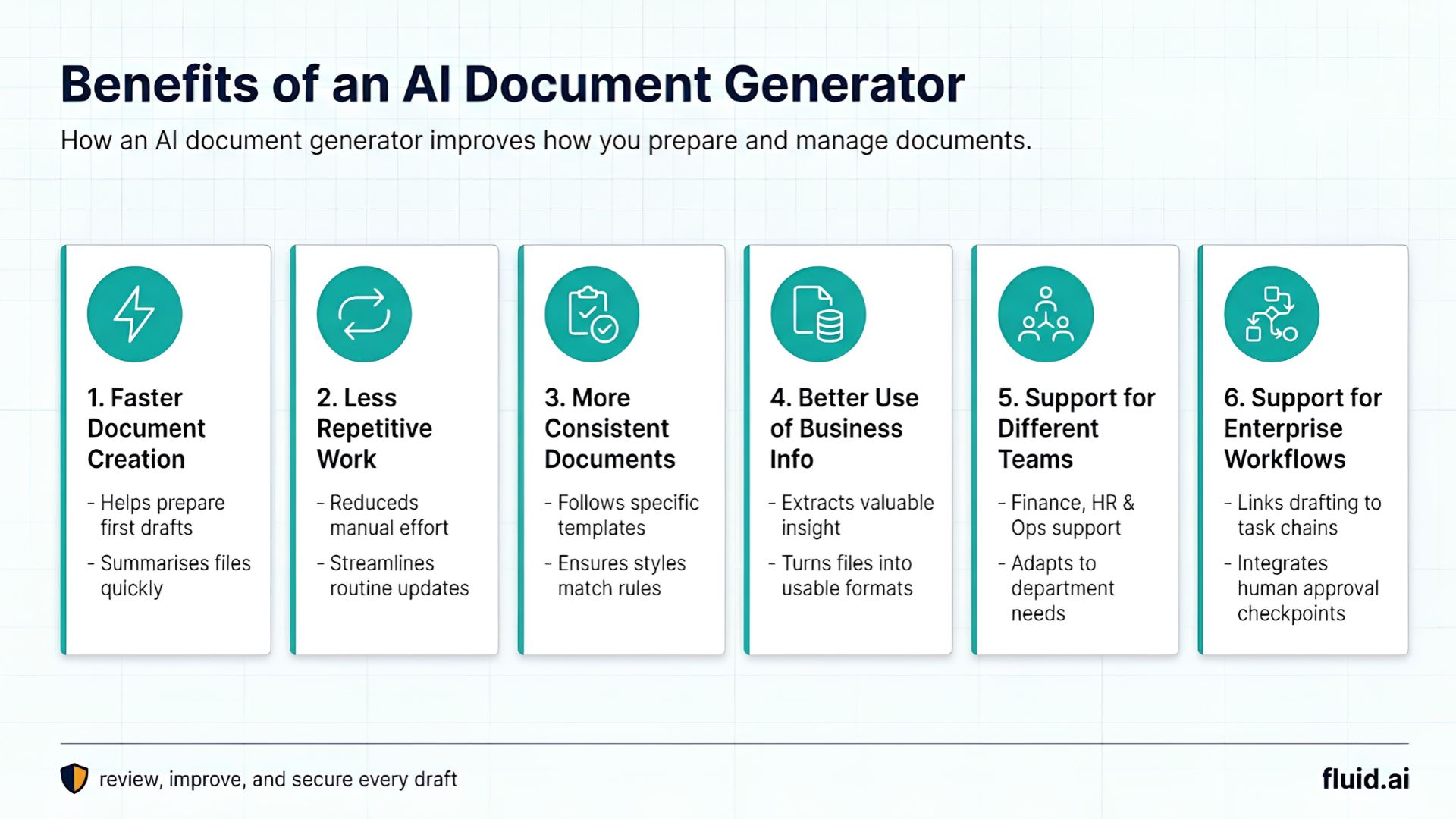
An AI document generator can help businesses improve how they prepare and manage documents.
The main benefits include the following.
1. Faster Document Creation
AI can help prepare first drafts, summarise source files, and organise information.
Employees can then spend more time reviewing and improving the document instead of starting from a blank page.
2. Less Repetitive Work
Tasks such as summarising reports, preparing routine updates, and organising information often follow similar patterns.
AI can help reduce the manual effort involved in these tasks.
3. More Consistent Documents
Businesses may require documents to follow specific templates, writing styles, or structures.
With clear instructions and suitable templates, AI can help produce more consistent drafts.
The final output still needs to be checked against the organisation's requirements.
4. Better Use of Business Information
Documents often contain useful information that employees need for reports, decisions, and internal communication.
AI can help extract, summarise, and organise this information into a more usable format.
5. Support for Different Business Teams
AI document generation is not limited to one department.
Finance teams can use it to prepare report drafts. HR teams can use it to organise employee communications. Operations teams can use it to prepare updates and internal notes.
The specific applications depend on each team's needs and the tools available.
6. Support for Enterprise Workflows
Some enterprise AI platforms can connect document creation with other business tasks.
For example, a workflow may involve collecting information, preparing a draft, checking the result, and sending it to a person for approval.
This can help businesses move beyond individual writing tasks towards more connected office work.
AI Document Generator vs. Manual Document Creation
How does AI document generation compare with traditional document creation?
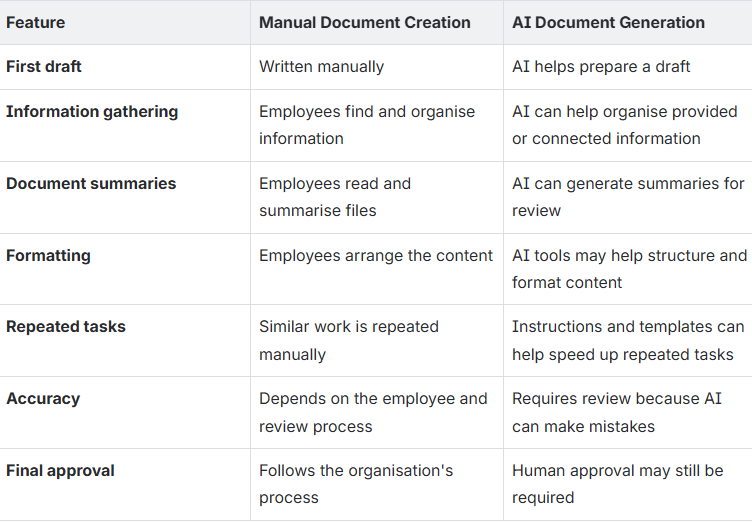
AI does not remove the need for employees.
Instead, it helps them complete parts of the document creation process more efficiently.
How to Choose the Right AI Document Generation Software
Not every AI document generator is designed for business use.
A basic writing assistant may be enough for simple emails or short drafts. An enterprise organisation may need a solution that works with internal documents, follows company rules, and supports more complex tasks.
Before choosing AI document generation software, consider these factors.
1. Document Creation Capabilities
Check whether the tool supports the documents your team needs to create.
These may include reports, office notes, business letters, presentations, and summaries.
Also check whether it can work with existing documents rather than generating content only from a blank prompt.
2. Support for Multiple File Types
Business information often comes in different formats.
Check whether the tool can work with the file types your organisation uses, such as PDFs, spreadsheets, and text documents.
If employees need to combine files or extract information from several sources, make sure the tool supports those tasks.
3. Accuracy and Source Verification
AI-generated content may contain incorrect details or miss important information.
Look for features that help employees verify outputs against source documents.
For business-critical work, employees should be able to check names, dates, figures, references, and other important details.
4. Data Security and Privacy
Business documents may contain confidential information, customer records, financial data, or internal policies.
Before adopting a tool, understand where the data is processed, how it is stored, who can access it, and whether it is used for model training.
For enterprise deployments, evaluate whether the solution meets your organisation's security and compliance requirements.
5. Integration With Existing Systems
Employees should not have to change their entire working process to use AI.
Check whether the solution can work with your existing document repositories, enterprise applications, and approved workflows.
Available integrations will depend on the product and deployment.
6. Human Review and Approval
Some documents require formal review before they can be shared or approved.
Look for ways to keep employees involved in checking and approving AI-generated content.
The level of human oversight should match the importance and risk of the task.
7. Ability to Handle Multi-Step Tasks
Some document tasks involve more than writing.
For example, preparing an office note may require reading an invoice, checking an approval letter, reviewing a policy, organising the information, and creating a structured draft.
If your team handles these tasks regularly, look for an AI solution that supports the complete workflow rather than only generating text.
How Fluid AI Helps With AI Document Drafting and Office Work
Fluid AI helps businesses use AI for everyday office tasks, including working with documents and preparing content.
Its AI Document Drafting and Office Work use case focuses on helping employees work with documents and complete common content-related tasks.
Instead of treating every task as a separate manual activity, employees can use AI-assisted tools to prepare and organise information.
1. Create Documents From Existing Information
Business documents often depend on information that already exists in other files.
Fluid AI supports document workflows that help employees work with source material and prepare structured outputs.
This is useful when employees need to bring information together before creating a document.
2. Work With PDFs
PDFs are commonly used for invoices, policies, reports, letters, and other business records.
Fluid AI's document-work capabilities include combining PDFs and working with document content.
This can help employees manage supporting files as part of their document preparation process.
3. Prepare Office Notes
Office notes may require information from several documents before a draft can be prepared.
Fluid AI demonstrates an Office Note Generator designed around a guided process in which users provide material, work through the task, refine sections, and check the result.
This approach can help employees organise information into a structured draft.
4. Translate Documents
Businesses may need to work with documents in different languages.
AI-assisted translation can help prepare translated versions of content for further review.
The output should be checked when the document contains important business, legal, or technical information.
5. Create Business Content
Fluid AI also supports AI-assisted creation of branded visual content and presentations as part of its broader enterprise AI capabilities.
This can help teams move from source information to content that is easier to share and present.
6. Support Enterprise Requirements
Enterprise teams may need more than a tool that creates text.
They may also need to consider data access, deployment, security, and integration with existing systems.
Fluid AI offers enterprise AI capabilities designed for different infrastructure and business requirements. The right setup depends on the organisation's use case and technical needs.
The goal is to help employees spend less time preparing documents manually and more time reviewing information, making decisions, and completing their work.
To understand how these capabilities could fit your team's processes, explore the Fluid AI document drafting and office work solution.
Frequently Asked Questions About AI Document Generators
1. How do I create a document using AI?
Start by explaining what document you need. Provide the relevant information or source files, give clear instructions, and let the AI prepare a draft. Review the result, correct any errors, and approve the final document.
2. Can AI generate business documents?
Yes. AI tools can help prepare business reports, office notes, letters, emails, meeting summaries, proposals, and presentations. The available features depend on the tool.
3. Is AI-generated content always accurate?
No. AI can produce incorrect information, misunderstand instructions, or miss important details. Employees should verify important facts against the original documents before using the output.
4. What should businesses look for in AI document generation software?
Businesses should consider document creation features, support for source files, accuracy, security, integrations, workflow capabilities, and human review. The best solution depends on the documents and processes the organisation wants to improve.
5 How is an AI document generator different from a basic AI writing tool?
A basic AI writing tool mainly helps create or improve text. An AI document generator may offer additional features, such as working with source files, structuring business documents, applying templates, and preparing different types of outputs. Enterprise solutions may also support connected workflows.
6. Can Fluid AI help with document drafting and office work?
Yes. Fluid AI supports AI-assisted document drafting and office work, including working with PDFs, preparing office notes, translating files, and creating content. The available capabilities depend on the specific tool and workflow.
Explore the Fluid AI document drafting and office work use case to learn more.
Conclusion
AI document generators help businesses create and organise documents with less repetitive manual work.
From preparing reports and office notes to summarising PDFs and translating content, AI can support many everyday office tasks.
However, choosing the right tool requires more than looking at how quickly it can generate text. Businesses should also consider accuracy, data security, integrations, and the need for human review.
For organisations looking to apply AI to everyday office work, the next step is to identify a document task that takes too much time and evaluate how AI can improve the process.
Explore Fluid AI's document drafting and office work capabilities to see how AI can support your team's document workflows.
_1790254083168-CB8e8KXC.png)