SAP AI and Agentic AI: How Fluid AI Connects SAP Data (2026 Guide)

TL;DR
Most SAP AI projects do not fail on the model. They fail on the connection. Getting an agent to read SAP cleanly, understand it in context, and act on it safely is the hard part. Fluid AI solves it with seven enterprise-approved SAP connectors, a two-layer SAP semantic layer (vector plus graph), and production-grade SAP AI agents that run inside real governance. The result is a platform live in weeks, not a science project that stalls at month six.
Why SAP AI is really a connection problem
Ask most teams about SAP AI and the conversation jumps straight to the model. Which LLM, which benchmark, which demo.
That is the wrong first question.
The models have largely commoditized. Whether an agent runs on Claude, Gemini, or an open weight model, the frontier moves every few weeks and the gap keeps closing. The durable value has moved one layer up, into the agentic harness: the layer that connects to complex enterprise systems, holds context, and takes action reliably.
For an enterprise running SAP, that harness lives or dies on one thing. Can it connect AI to SAP the way your teams already work, without breaking governance, and then reason over that data accurately.
This is where agentic AI for SAP gets separated from a slide deck. A refinery, a bank, or an insurer does not want a chatbot bolted onto SAP. It wants agents that read S/4HANA, ECC, and RISE, understand a tag number or an SKU exactly, and trigger a root cause analysis or a CapEx estimate on their own.
What "SAP AI" actually means in an agentic world
SAP AI is any use of artificial intelligence on top of your SAP landscape. SAP business AI, generative AI in SAP environments, and SAP agentic AI all sit under that umbrella, but they are not the same thing.
Generative AI answers questions. Agentic AI does work. It plans, calls tools, queries systems, and completes a task end to end.
Agentic AI for SAP means agents that treat SAP as a live source and a live destination. They pull from SAP in real time, reason over it, and write results back or fire an alert. That only works if the SAP data integration underneath is enterprise-grade. So that is where any serious SAP AI platform has to start.
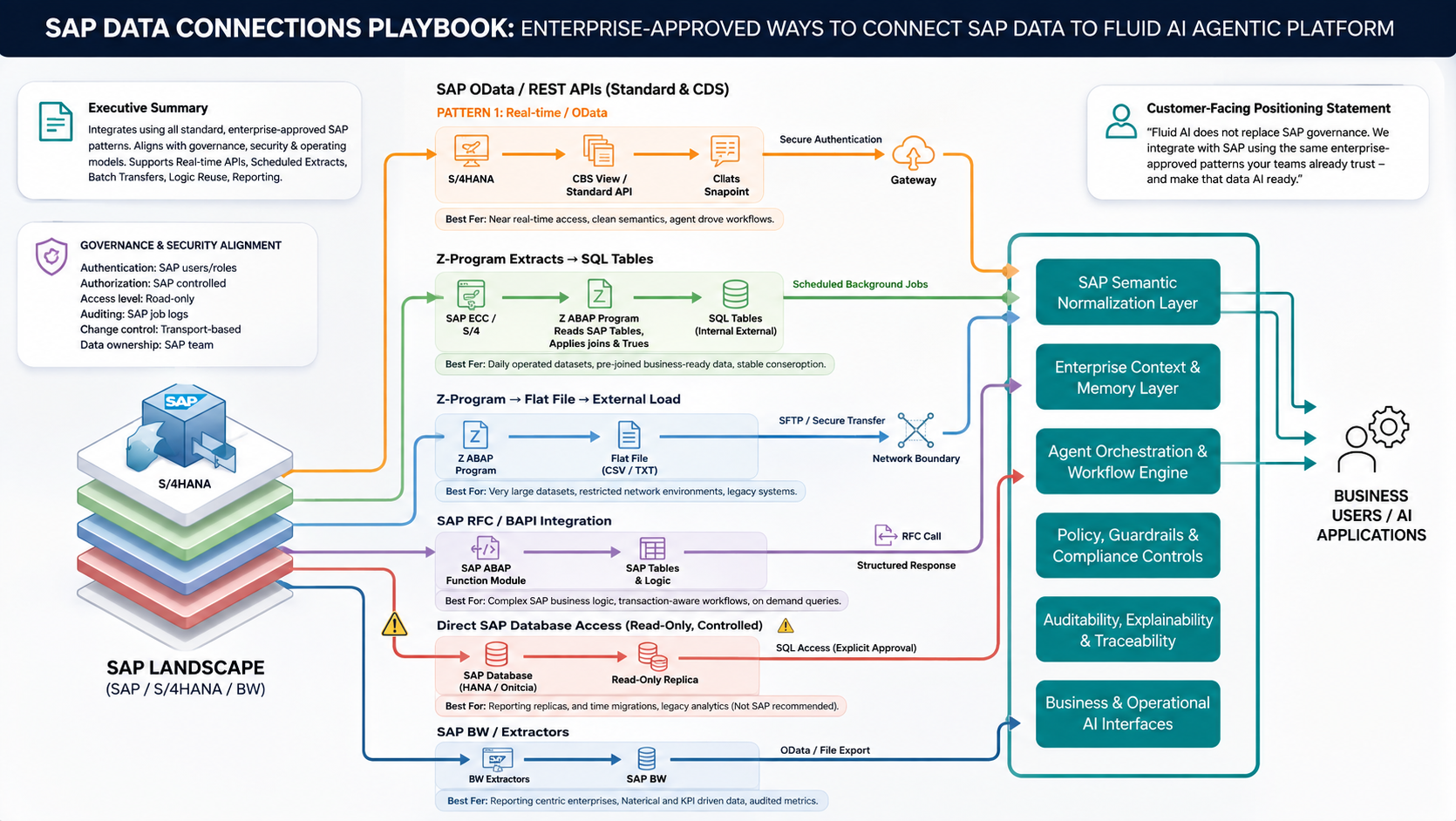
Seven enterprise-approved ways to connect SAP data
There is no single right way to connect AI to SAP. There are several, and the correct one depends on the data, the latency, and the network. Fluid AI supports all of them, so the integration matches your operating model instead of forcing a new one.
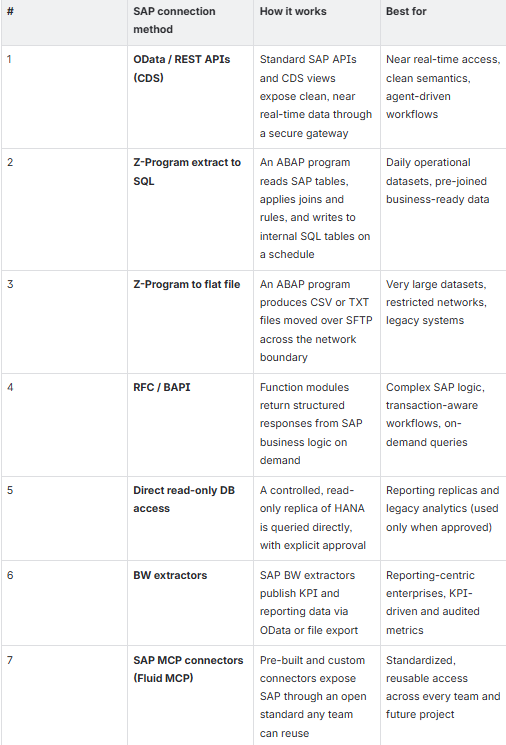
Here is what each one actually means, and how Fluid AI uses it.
1. OData and REST APIs (CDS)
What it is. SAP's own standard APIs and CDS views, which expose business data over a secure gateway without touching the underlying tables directly.
Why it matters. This is the cleanest, most future-proof way to read SAP. The data comes out already structured with proper business semantics, so an agent gets meaning, not raw table rows. It also stays near real-time.
How Fluid AI does it. The OData connector works across S/4HANA, ECC, and RISE for quick lookups, so data stays live in SAP and the agent pulls it on demand. For high-volume real-time flows, the PI/PO adapter is the most requested pattern we deploy. This is the default choice for agentic AI for SAP whenever the source supports it.
2. Z-Program extract to SQL
What it is. A custom ABAP program reads SAP tables, applies the joins and business rules, and writes the result into internal SQL tables on a schedule.
Why it matters. Some data needs to arrive pre-joined and business-ready every morning, not assembled on the fly. Pushing that logic into a scheduled extract gives you stable, predictable datasets that are cheap to query all day.
How Fluid AI does it. Scheduled background jobs handle the extract, and the platform runs incremental syncs so only changed records move. That keeps the agent working on current data without re-pulling everything each time.
3. Z-Program to flat file
What it is. An ABAP program writes the data to a CSV or TXT file, which then moves over SFTP across the network boundary into the platform.
Why it matters. In restricted or air-gapped environments, a direct connection is not always allowed, and very large datasets are often easier to move as files. This pattern respects tight network rules and handles legacy systems that expose little else.
How Fluid AI does it. Files land through a secure transfer at the network boundary and get ingested and vectorized automatically. This is the fallback that keeps SAP data integration possible even in the most locked-down landscapes.
4. RFC and BAPI
What it is. Remote function calls into SAP function modules and BAPIs, which return a structured response straight from SAP business logic.
Why it matters. Some answers do not live in a table. They come from running SAP's own logic, often inside a transaction. RFC and BAPI let an agent invoke that logic on demand and get back a clean, structured result.
How Fluid AI does it. Agents call RFCs and BAPIs directly, and custom ABAP scripts can be written for any bespoke logic your teams need. This is what enables transaction-aware SAP AI agents rather than read-only lookups.
5. Direct read-only database access
What it is. A controlled, read-only replica of the HANA database that the platform queries directly, only ever with explicit approval.
Why it matters. For reporting replicas and legacy analytics, direct database access is sometimes the pragmatic route. But it sits outside SAP's own recommendations, so it should be the exception, not the norm.
How Fluid AI does it. Access is read-only, scoped to an approved replica, and used only when the standard patterns above cannot serve the need. Nothing writes back through this route, so SAP governance stays intact.
6. BW extractors
What it is. SAP BW extractors publish KPI and reporting data, delivered out via OData or file export.
Why it matters. Reporting-heavy enterprises already model their key metrics in BW. Reusing those extractors means the agent reads the same audited, KPI-driven numbers the business already trusts, with no re-derivation.
How Fluid AI does it. The platform consumes BW output through OData or file export and folds it into the same semantic layer as every other source, so a single agent can reason across operational and reporting data together.
7. SAP MCP connectors (Fluid MCP)
What it is. An open-standard connector layer, Fluid MCP, with a registry of pre-built connectors plus custom connectors built for your systems: a SAP MCP, a SQL MCP, and whatever else your core stack needs.
Why it matters. This is the pattern that prevents lock-in. Normally one vendor builds the SAP connection and only that vendor can use it. SAP MCP turns the connection into shared infrastructure any team can reuse.
How Fluid AI does it. Build the SAP connection once, and any future agentic project, even one your own team builds in a different framework, connects through the same MCP in minutes instead of rebuilding connectors from scratch. You get an infrastructure baseline, not a dependency.
Every one of these SAP connectors aligns with SAP governance rather than working around it. Authentication stays on SAP users and roles, authorization stays SAP-controlled, access stays read-only where it should be, and change control stays transport-based. Fluid AI does not replace SAP governance. It integrates using the same enterprise-approved patterns your teams already trust, and makes that data AI ready.
SAP MCP and Fluid MCP: the connector layer that stops vendor lock-in
Integrations usually create a hidden trap. One vendor builds the SAP connection, and from then on only that vendor can talk to the system.
SAP MCP breaks that. Fluid MCP is an open standard connector layer with a registry of pre-built connectors, plus custom connectors for your systems: a SAP MCP, a SQL MCP, and whatever else your core stack needs.
The payoff is reuse. Build the SAP connection once, and any future agentic project, even one your own team builds in a different framework, connects through the same MCP in minutes instead of rebuilding connectors from scratch. You get an infrastructure baseline, not a dependency.
Beyond the pipe: the semantic layer that makes SAP data usable
Connecting to SAP is necessary. It is not sufficient. Enterprise data is messy, and the same pump gets written five different ways.
Fluid AI builds two semantic layers so agents match meaning, not just spelling.
The first is a traditional vector database, strong at scanning across different wordings and spelling mistakes. The second is a graph contextual SAP semantic layer that traverses the relationships in your plant or your ledger, so a match stays accurate even when the query is not exact.
In practice that means a query for P501AB, P 501AB, or P501 A/B all resolve to the same transfer pump. On a legacy inventory master of roughly [X] thousand SKUs, the system finds the nearest neighbor automatically despite dashes, typos, or changed formatting. This is what turns raw SAP data integration into answers a plant engineer or an analyst will actually trust.
From connection to action: SAP AI agents that do the work
Once the data is connected and understood, the agents take over. This is the difference between a search box and true SAP agentic AI.
How the agent layer is structured:
A router agent reads each request and decides which sub-agents should handle it, then assembles the final answer.
Underneath sit specialized SAP AI agents, each with its own tools, connected systems, and instructions.
Every agent draws on a library of 40-plus pre-connected LLMs, plus your own MCP tools.
Three agent patterns cover most enterprise needs.
1. Trigger workflows fire the moment something happens:
The trigger can be a SQL alarm, an inbound email, or a SCADA notification.
The agent runs a root cause analysis using a fishbone or five-why method.
It sends the result out over email automatically, with no one having to log in.
On a pipeline, every SCADA alarm flows into the agent, which classifies it as false positive or true positive, updates a live dashboard, and can trigger a call to the nearest responder.
2. Scheduled workflows run on a fixed cadence:
Set them to run every day, every Friday, or any interval you choose.
The agent summarizes the alarms and events in that window and returns a prioritized action list.
3. Autonomous agents run multi-pass to reach a decision:
Ask one to model a throughput increase and it looks up multiple sources and runs several passes on its own.
It then generates a finished Excel report with the full analysis laid out.
That is SAP business AI producing a decision, not a paragraph.
Security, governance, and evaluation built in
Enterprise SAP AI is judged on control as much as capability.
PII is redacted instantly through an inbuilt pipeline, so any personal data hitting the system is masked at the point of ingress. The platform is SOC 2 Type II and ISO 27001 certified, runs hardened containers on the OpenShift Kubernetes standard with no root access, and integrates with LDAP and Active Directory so every user is accountable. Access is enforced at folder and group level, with separate admin, user, and knowledge-base-admin roles.
Seven reporting screens track conversations, token usage, tool-call distribution, and response times, which surfaces anomalies early. A spike in one user's tool calls or a shift in conversation pattern is exactly what data exfiltration looks like, so it gets caught in real time. Rate limits at both the pool and per-user level keep cost and risk bounded.
Accuracy is not left to hope. Built-in evaluation runs agentic evals and question-answer pairs, then reports every answer as correct, hallucinated, or partly correct, with the chunks retrieved. You tune the model, chunk size, vector size, re-ranker, and RAG strategy, and re-run the eval whenever a new model lands so you can move up a version with zero risk. Every workflow is versioned, and only a stable, tested version goes live.
Why services teams stall and platforms win?
There are three kinds of players in this market, and the difference shows up at the deadline.
Traditional RAG vendors can wire something together with open-source libraries, but it is rarely production-ready: no audit log, no versioning, no safe upgrade path. Services teams building from scratch on frameworks like LangChain and LangGraph spend four to five months just standing up the platform, interfaces, access controls, syncing, and vectorization, so users do not see anything real until month six, by which point the team is exhausted and the feedback lands late.
A product-led approach inverts that. The platform is live in month one. Users are giving feedback by week six. The specialized work is done by month three, a 12-week timeline. And you get a copy of the source code with the right to use, modify, and extend it, so there is no vendor lock-in when the contract ends.
Fluid AI has spent 14-plus years in this space, holds 2 US patents, and runs in over 60 languages, on-premise or cloud. Data can stay fully on-premise, with only the final inference request going to a dedicated, Fluid-routed cloud instance. Because token cost is purely the LLM cost, it does not change based on where the server sits.
Book your Free Strategic Call to Advance Your Business with Generative AI!
Fluid AI is an AI company based in Mumbai. We help organisations kickstart their AI journey. If you're seeking a solution for your organisation to enhance customer support, boost employee productivity and make the most of your organisation's data, look no further.
Take the first step on this exciting journey by booking a Free Discovery Call with us today and let us help you make your organisation future-ready and unlock the full potential of AI for your organisation.
Frequently asked questions
1. Does SAP have AI, and how is SAP AI different from Fluid AI?
SAP offers its own AI features. Fluid AI is an independent agentic AI for SAP platform that connects to your SAP landscape through standard connectors and adds an agent layer, a semantic layer, and enterprise governance on top.
2. How do you connect AI to SAP?
Through seven enterprise-approved methods: OData and REST APIs, Z-program extracts to SQL, Z-program flat files, RFC and BAPI, controlled read-only database access, BW extractors, and SAP MCP connectors. The right choice depends on latency, data volume, and network rules.
3. Can AI replace SAP?
No. SAP AI works with SAP, not instead of it. Agents read from and write to SAP while all authentication, authorization, and change control stay under SAP governance.
4. Where should you start with generative AI in SAP environments?
Start with the connection and the semantic layer, not the model. Clean, context-aware SAP data integration is what makes every downstream generative AI and agentic use case reliable.
5. What does deployment look like?
Platform live in month one, user feedback by week six, core use cases delivered by month three, with a source-code handoff and no lock-in.
Ready to put SAP agentic AI into production?
See the seven SAP connectors and the agent layer running on your own data. [Book a Fluid AI demo.]
Want the full integration and governance breakdown for your SAP landscape? [Talk to our team.]
_1790254083168-CB8e8KXC.png)