Human in the Loop AI: Balancing Autonomy and Human Oversight in SAP Workflows

TL;DR
Human-in-the-loop AI does not mean a person needs to approve every answer an AI agent gives.
In enterprise systems like SAP, the better approach is to let AI read information, search records, check rules, prepare recommendations and draft actions. But before it writes data, makes a payment or changes a business record, a person should approve it.
This is the idea behind split autonomy: give AI freedom to do the work it can safely handle, and keep people in control of decisions that carry business consequences.
For enterprises, getting this boundary right matters just as much as the AI model itself.
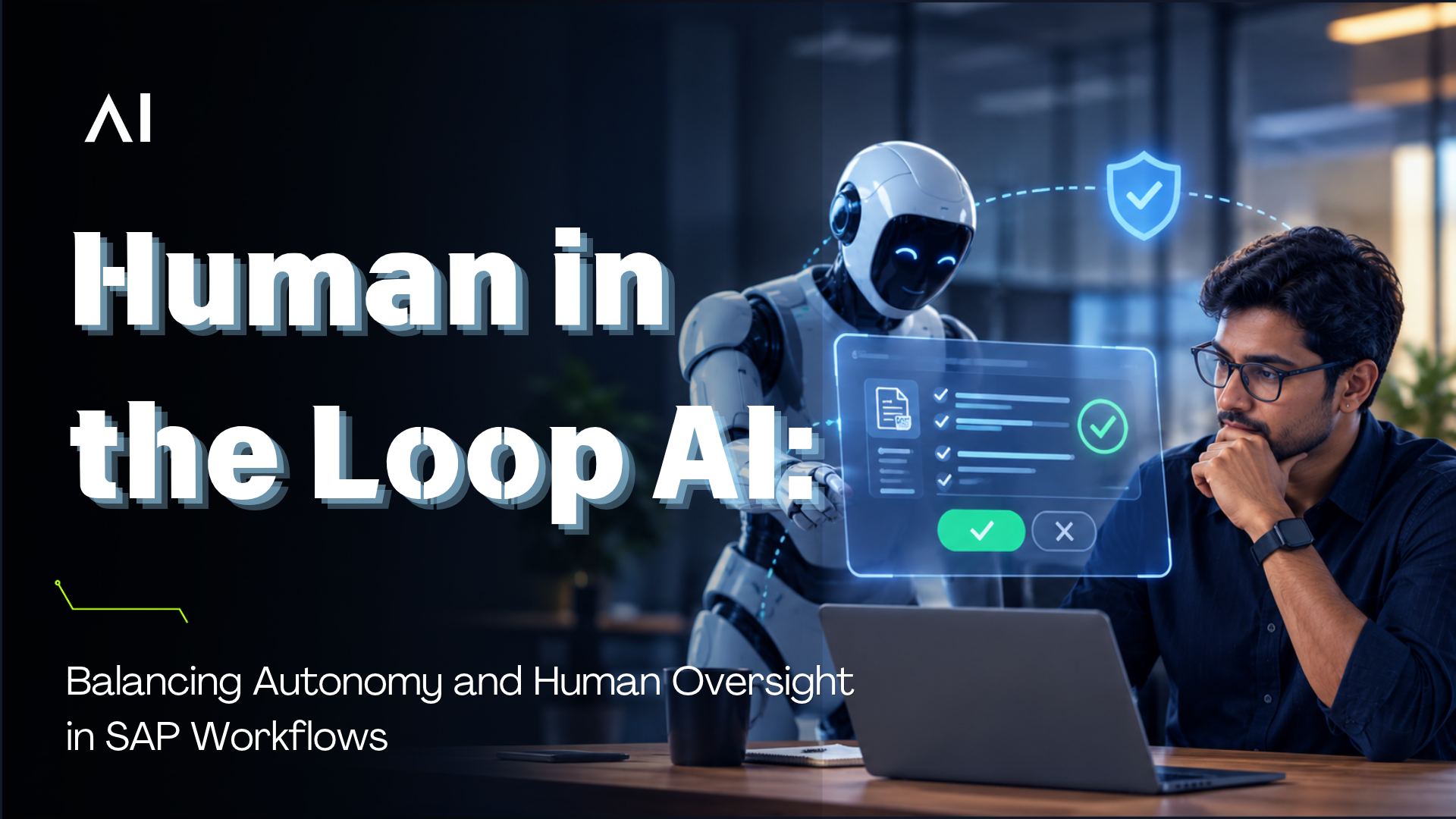
AI agents can now read enterprise data, interact with SAP and handle tasks that once required hours of manual work.
But how much control should we actually give them? What happens when an agent needs to change a business record, approve a transaction or handle something it isn't sure about?
That's where human-in-the-loop AI comes in!
In this article, we'll look at how enterprises can balance AI autonomy with human approval, how this works in real SAP workflows, and the controls needed to make it work in production. Read till the end to understand how to let AI do more without giving up control.
1. The real question isn't whether AI needs human approval
Most enterprise leaders have moved past asking whether AI can answer questions.
They want to know whether it can do something useful with the answer.
Can it check a supplier record? Can it find a mismatch in stock? Can it prepare a bill of materials using SAP data? Can it raise a ticket when a vendor reports a problem?
These are the kinds of tasks that make AI agents useful inside an enterprise.
But there is a difference between finding information and changing a business system.
An agent might find that a stock record does not match the physical inventory. It can gather the relevant records, identify the difference and prepare a recommendation.
Should it automatically change the stock quantity in SAP?
Not necessarily.
That change could affect procurement, inventory planning, finance and audit records. Someone needs to understand the evidence and approve the action.
This is where human-in-the-loop AI becomes important.
The goal is not to put a person between the AI and every task. That would simply move the bottleneck from one place to another.
The goal is to decide which actions AI can take independently and which actions need human approval.
2. What human-in-the-loop AI actually looks like in SAP
Human-in-the-loop AI is often explained as a person reviewing an AI-generated answer before it is used.
That is only one part of it.
In an enterprise workflow, human oversight needs to cover the entire action, not just the final response.
Consider an AI agent working with SAP in a procurement or supply chain environment.
A useful workflow looks like this:
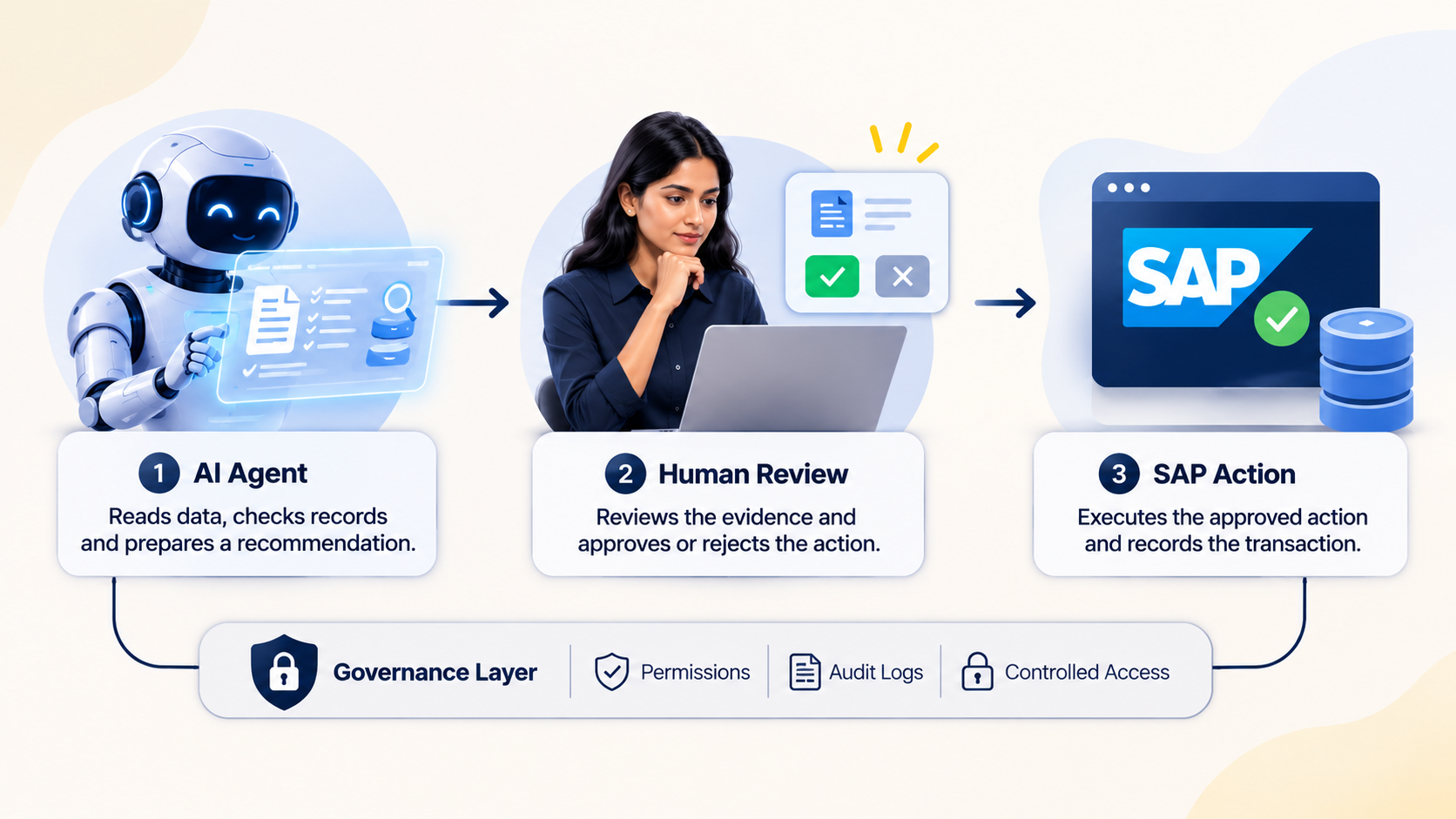
Step 1: Read the relevant information
The agent retrieves the information it needs from SAP and other approved enterprise systems. This could include material records, purchase orders, supplier information or historical transactions.
Step 2: Check the information
It compares records, checks available business rules and looks for missing or conflicting information.
For example, two material descriptions may look similar but refer to different specifications. The agent should identify that uncertainty rather than assume they are the same item.
Step 3: Prepare a recommendation
The agent suggests what should happen next. It could recommend correcting a record, raising a ticket, reviewing a mismatch or routing a request to another team.
Step 4: Show the evidence
The person reviewing the recommendation should be able to see what information the agent used, what it found and why it suggested that action.
An approval without context is just another button to click.
Step 5: Let the right person decide
The authorised employee can approve, reject or edit the recommendation. If the case is too complex, it can be passed to a person for further investigation.
Step 6: Execute and record the action
Only after approval does the agent carry out the permitted write action in SAP. The transaction and relevant activity are logged for later review.
<em>This is the important distinction: the AI prepares the action, but the authorised person controls whether it happens.</em>
3. Why SAP integration is where many AI projects get difficult
An AI agent can give a correct answer and still fail when it tries to complete the task.
The reason is often not the model. It is the connection to the enterprise system.
SAP environments are rarely identical. Companies may use different versions, custom workflows, integrations, data structures and access rules. An agent that works in a demo environment may not behave the same way when connected to a live system.
As Fluid AI Co-founder, Abhinav puts it:
"We are SAP specialists, we've done R3, ECC, S/4 HANA. It always fails when someone hasn't integrated with SAP before."
This is an important point for enterprise AI projects.
Connecting an agent to SAP is not simply a matter of giving it an API and asking it to perform tasks. The integration needs to account for how the organisation actually uses SAP.
A few things need to be considered:
System access: Which SAP records can the agent read? Which actions can it perform?
Data structures: How are material codes, supplier records and other business objects represented?
Transaction handling: What happens if an API call fails, credentials expire or the data format changes?
Approval rules: Which actions need an authorised employee before execution?
Auditability: Can the organisation trace what the agent accessed and what it changed?
Most production failures are not simply wrong answers. They can come from the tools an agent uses: an incorrect API, an expired credential or a changed data format.
That is why SAP integration and action control need to be designed together.
4. Split autonomy: let AI work, but control what it can change
At Fluid AI, the approach is called split autonomy.
The principle is straightforward:
AI can read.
AI can search.
AI can compare.
AI can analyse.
AI can prepare and draft.
A person approves before anything is written, paid or changed.
This avoids two common mistakes.
The first is giving an AI agent too little freedom. If a person has to approve every search, every lookup and every draft, the workflow becomes slow. The agent is not doing enough of the work.
The second is giving it too much freedom. An agent that can independently change records, trigger transactions or make financial decisions without the right controls creates a different kind of risk.
Split autonomy creates a boundary between the two.
<em>Read access and preparation can be automated. Business-changing actions need the right level of permission.</em>
This boundary can also change depending on the task.
A routine information request may need no human intervention. A supplier query that requires a ticket can be handled automatically within approved rules. A complex case can be handed to a person. A change to a sensitive business record can require explicit approval.
Human oversight should depend on the action's impact, not simply on whether an AI agent is involved.
5. Human oversight needs more than an approval button
An approval workflow is useful only when the organisation can control what happens before and after approval.
That requires several layers of governance.
Human takeover
A person should be able to step into an AI conversation when the situation needs judgement or the agent cannot resolve the request.
For example, a supply chain helpdesk agent can answer vendor questions through voice and email, create tickets and route only complex cases to people.
The human agent does not need to handle every routine query. They can focus on the cases that actually need their attention.
Role-based access
Not every employee should have the same permissions.
The customer's own administrators should be able to decide who can access information, approve actions and perform specific operations.
This keeps the agent's permissions tied to the organisation's access structure.
Transaction-level audit logs
Enterprises need to know what happened, not just what the agent said.
A useful audit setup should cover three levels:
User activity: Who interacted with the system?
Transactions: What actions or transactions took place?
Underlying system activity: What happened in the connected system?
These records help teams investigate issues and provide evidence during audits. Customers should be able to request the relevant logs when needed.
Personal-data protection
Documents and conversations can contain names, identification numbers and financial details.
Personal information should be hidden automatically where required, rather than relying on employees to remember to remove it manually.
Customer-controlled change management
AI systems should go through the customer's own testing and release process.
In this setup, customer QA teams test the system before go-live, and the code is maintained in the customer's GitLab.
This matters because the enterprise should remain involved in how its systems are tested, changed and deployed.
Human-in-the-loop AI is not just about a person approving an individual action. It is also about giving the organisation control over the system itself.
6. What this looks like in real enterprise workflows
The value of human oversight becomes clearer when AI agents are connected to actual business processes.
Across Fluid AI's live enterprise use cases, the same principle appears in different forms.
CAPEX estimates connected to SAP
Engineers answer six questions and receive an SAP-linked bill of materials.
The tool draws on more than 200 past projects and saves around 60 minutes per project.
The agent does the information retrieval and preparation. Engineers can focus on reviewing the estimate and making the decisions that require their expertise.
Lube stock mismatch detection
An AI workflow flags stock mismatches in real time and prepares reports for audit.
The value is not just identifying a difference. It is making the mismatch visible to the people responsible for investigating and resolving it.
Pipeline alarm classification
An agent sorts pipeline intrusion alarms and filters out false alarms.
This helps teams focus their attention on alerts that need investigation instead of treating every incoming alarm as equally urgent.
Refinery manuals assistant
Employees can ask questions about refinery procedures and receive answers grounded in SOPs, with the source cited.
That source matters. In an operational environment, an answer should not be a statement with no way to check where it came from.
Supply chain helpdesk
An AI agent answers vendor queries through voice and email, creates tickets and passes complex cases to human employees.
Routine requests can move forward without waiting for a person. Cases that need judgement still reach the right team.
These are different workflows, but they share one design principle: automate the repeatable work while keeping people involved where their judgement or authority is needed.
7. Measure what the agent does, not just how many answers it gives
A chatbot can be measured by how many questions it answers.
An enterprise agent needs a more useful set of measurements.
Did it retrieve the correct record? Did it call the right system? Did it complete the task? Did it route an exception to the right person? Was the final action authorised? Can the organisation trace what happened?
One example of the level of operational detail available from a deployment is the tool usage recorded over 60 days:
463 database queries
91 API calls
6 calls to the SAP material system
These numbers show the kinds of system interactions that can be tracked. They are not, by themselves, proof of business impact. They need to be read alongside task completion, accuracy, exception rates and the amount of human effort required.
For production teams, a useful measurement framework includes:
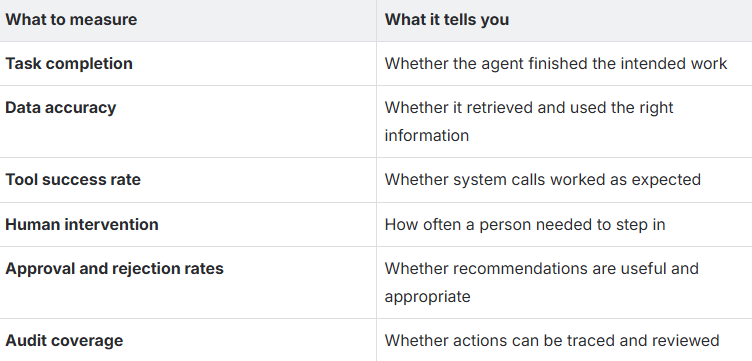
The point is to measure the work the agent completes, the mistakes it avoids and the decisions it correctly sends to people.
8. The next stage of enterprise AI is governed autonomy
Enterprises do not need AI agents that ask permission to do everything.
They also do not need agents that can change important business records without oversight.
They need systems that understand the difference.
An agent should be able to search thousands of records, prepare a recommendation, explain what it found and move routine work forward. But it should also know when it has reached a boundary.
That boundary needs to be built into the workflow through permissions, approval steps, audit logs, human takeover and controlled deployment.
For regulated and operationally critical industries, this is becoming a core buying requirement.
As we see it at Fluid AI, governance is becoming the product.
The next generation of enterprise AI systems will need more than a capable model. Buyers will want to know whether they can see every action, stop an agent when needed, control where inference happens and retain authority over their own systems and data.
Fluid AI builds enterprise agentic AI systems with on-premise deployment options, human takeover, role-based access and controlled integrations with enterprise systems such as SAP.
With 14+ years in business, 2 US patents, ISO 27001 and SOC 2 Type II, Fluid AI has built and deployed production AI solutions across enterprise environments. Its standard deployment timeline is 12 weeks, with more than 14 live production solutions.
The goal is not to remove people from enterprise workflows.
It is to give them fewer repetitive tasks, better information and control over the decisions that matter.
Frequently asked questions
1. What is human-in-the-loop AI?
Human-in-the-loop AI is an approach where people review, guide or approve specific decisions and actions made by an AI system. In enterprise workflows, this can include reviewing recommendations, handling exceptions and approving changes to business systems.
2. How does human-in-the-loop AI work with SAP?
An AI agent can retrieve SAP data, compare records, check business rules and prepare a recommended action. Before it writes or changes a business record, the workflow can require approval from an authorised employee. The completed transaction can then be recorded for audit.
3. Why is human approval important for AI agents?
AI agents can interact with systems and trigger business actions. Human approval helps prevent unauthorised changes, gives employees control over sensitive decisions and provides a way to review actions that carry financial or operational consequences.
4. Does every AI agent action need human approval?
No. Requiring approval for every action can make automation slow. A better approach is to allow low-risk activities such as reading, searching and drafting within defined permissions, while requiring approval for actions that write, pay or change important business information.
5. What is split autonomy in AI?
Split autonomy is an approach where an AI agent has freedom to perform approved tasks such as reading information, searching records and preparing recommendations, but a human must approve specific actions before they are executed. It helps balance automation with enterprise control.
6. What controls should enterprises look for in human-in-the-loop AI?
Enterprises should look for role-based access, human takeover, approval workflows, transaction logs, personal-data protection, controlled system integrations and customer-led testing before deployment. These controls help organisations understand and govern what their AI agents can do.
Book your Free Strategic Call to Advance Your Business with Generative AI!
Fluid AI is an AI company based in Mumbai. We help organisations kickstart their AI journey. If you're seeking a solution for your organisation to enhance customer support, boost employee productivity and make the most of your organisation's data, look no further.
Take the first step on this exciting journey by booking a Free Discovery Call with us today and let us help you make your organisation future-ready and unlock the full potential of AI for your organisation.