MCP Server Security: How Enterprises Can Govern AI Connections

TL;DR
MCP allows AI applications to connect with external tools, services and data sources.
MCP servers can be added outside approved registries through local configurations, extensions, remote URLs and application code.
Not every unregistered server is unsafe. Internal development tools and private servers may be legitimate.
Unreviewed servers can introduce risks involving authentication, permissions, untrusted code and data exposure.
An MCP registry helps organisations maintain an approved list, but a list alone does not enforce every connection.
Enterprises need discovery, approval, access controls, monitoring and audit trails to govern MCP connections.
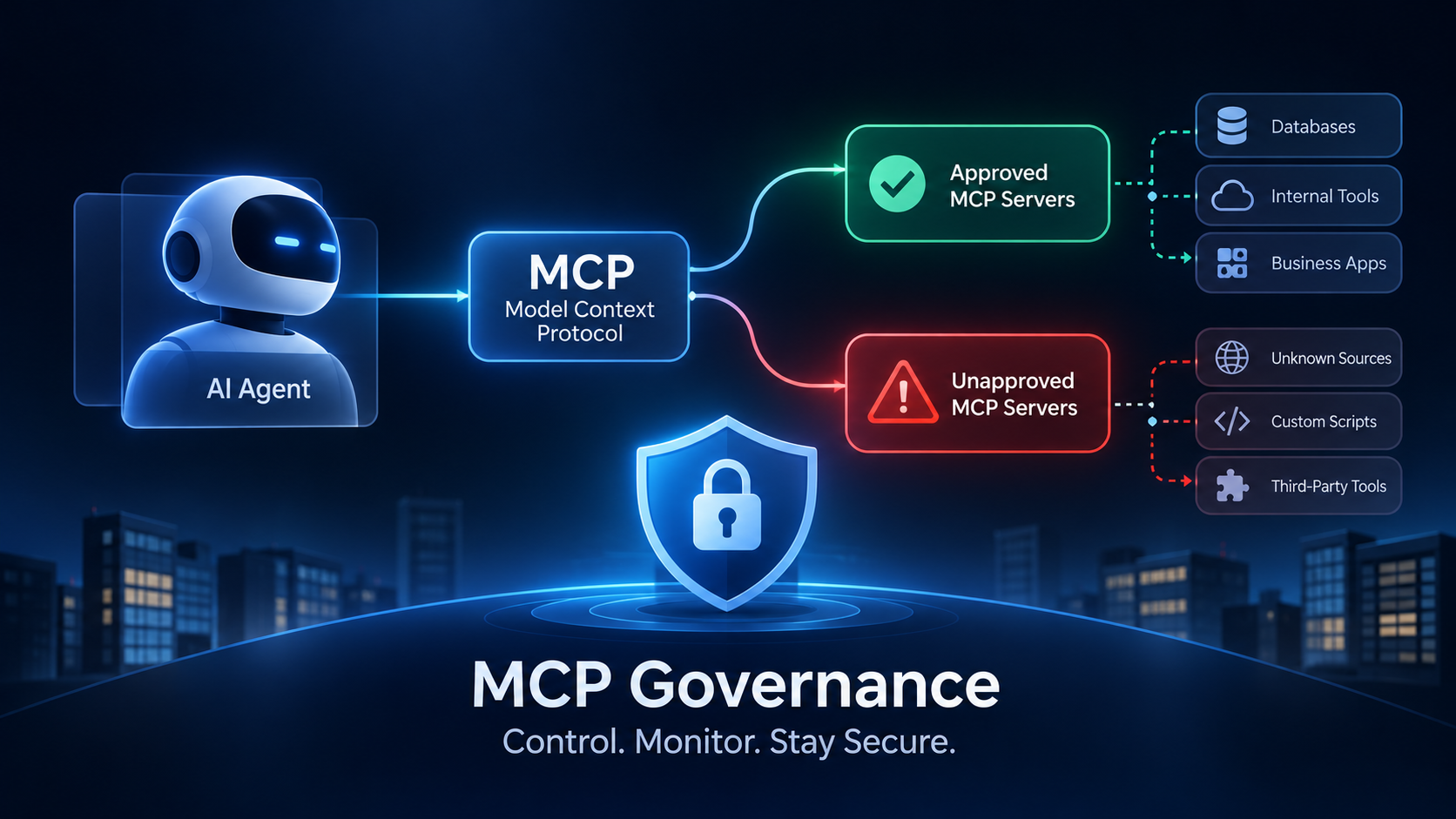
MCP Servers Outside the Registry: How Enterprises Can Secure AI Agent Connections
Introduction
AI agents are becoming more connected to enterprise systems.
They can retrieve information from databases, interact with internal applications, access business tools and execute tasks across different workflows.
Model Context Protocol (MCP) is helping make these connections easier.
Instead of building a separate integration for every AI application and tool, MCP provides a common way for AI applications to communicate with external tools and data sources.
But as MCP adoption grows, enterprises face a new challenge:
Do they know every MCP server their AI agents can connect to?
Many organisations maintain approved lists of tools and servers. However, developers can also add MCP servers through local configuration files, IDE extensions, remote URLs or application code.
These connections may never appear in the organisation’s approved registry.
Some are legitimate internal tools. Others may introduce security, access-control and compliance risks.
This creates a growing governance challenge for enterprise AI: managing not just the servers an organisation has approved, but also the connections its AI agents can actually make.
In this article, we’ll explain how MCP servers outside approved registries work, why they matter, where the risks come from and how enterprises can govern them.
What Is Model Context Protocol (MCP)?
Model Context Protocol, commonly called MCP, is an open protocol that standardises how AI applications connect with external tools and data sources.
Think of an AI agent that needs information from a company’s CRM.
Without a common integration approach, developers may need to build and maintain a separate connection between the AI application and the CRM.
MCP provides a standard interface for this communication.
An MCP architecture generally includes three components:
1. MCP Host
The host is the AI application that uses MCP. It could be an AI assistant, an agent platform or an AI-enabled development environment.
2. MCP Client
The client manages the connection between the host and an MCP server. It handles communication and requests.
3. MCP Server
The server exposes tools, resources or prompts that an AI application can use.
For example, an enterprise might have MCP servers that allow authorised AI applications to:
Retrieve customer information from a CRM.
Search internal knowledge repositories.
Access approved business databases.
Retrieve information from enterprise applications.
Interact with specific APIs and operational tools.
The important distinction is that MCP standardises communication. It does not automatically make every connected server trustworthy or every requested action safe.
Enterprises still need to decide which connections are permitted, what information can be accessed and which actions an agent can perform.
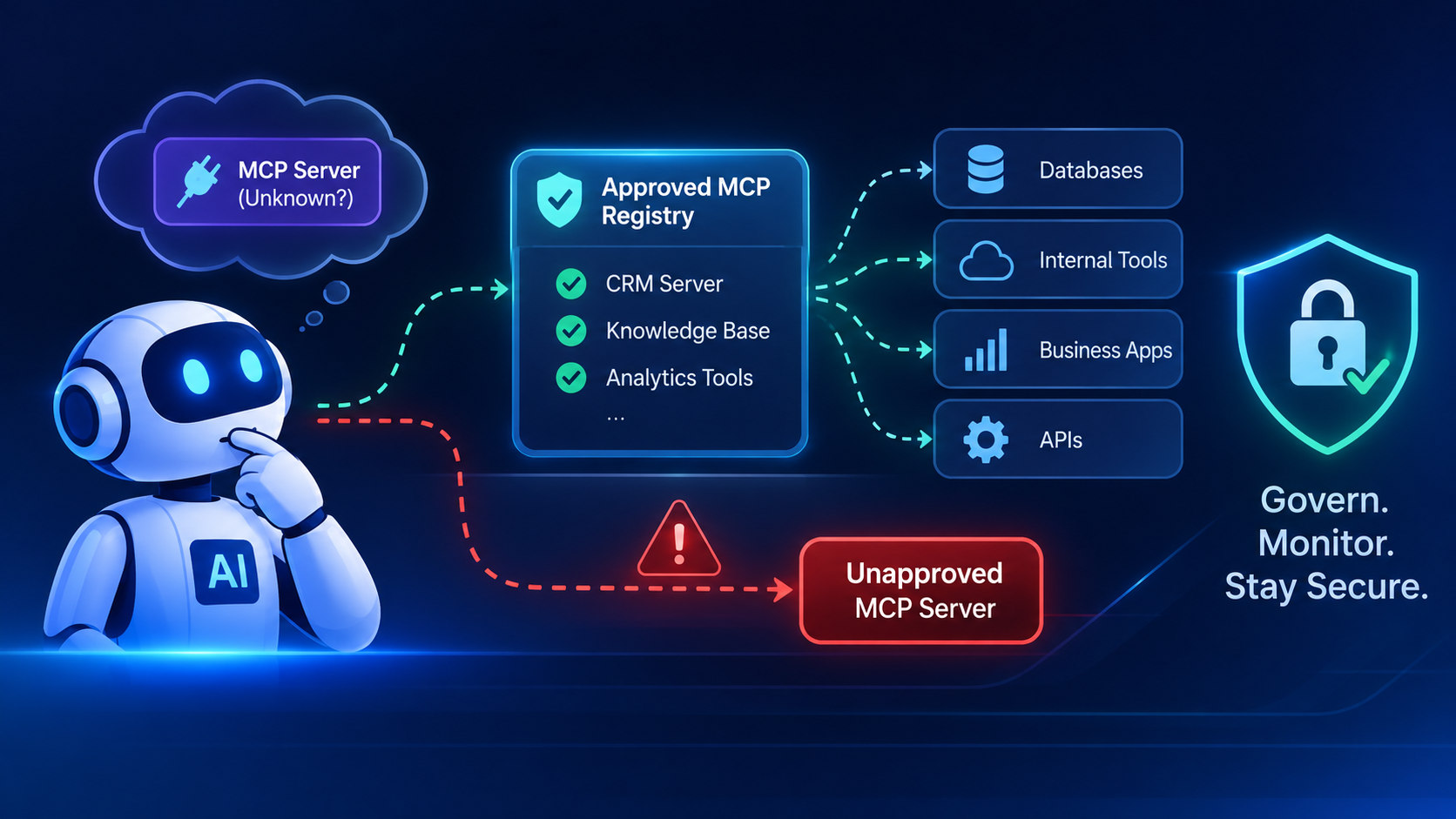
What Are MCP Servers Outside the Registry?
An MCP registry is a catalogue that helps developers and organisations discover MCP servers.
It can provide information about available servers, their identity and how they can be accessed.
However, not every MCP server is necessarily listed in a public or organisation-approved registry.
An MCP server outside the registry is simply a server that an AI application connects to without that server appearing in the organisation’s approved catalogue.
These connections can be introduced in several ways.
A. Manual Configuration
Developers can add MCP server details directly to an AI application’s configuration file.
For example, a developer may configure a local server to connect an AI assistant to an internal database.
The connection might work correctly, but the security team may not know it exists.
B. IDE Extensions and Developer Tools
Some development extensions can introduce additional MCP servers.
An employee may install an extension to improve their development workflow. That extension may register or launch an MCP server without going through the organisation’s normal approval process.
C. Remote MCP Server URLs
An AI application can connect to a remote MCP server using its endpoint.
A developer might add a server URL to an application to test a new integration.
If the endpoint is not reviewed or documented, the organisation may lose visibility into where its agents are sending requests.
D. MCP Servers Embedded in Application Code
Development teams can also configure MCP connections directly inside application code or automated workflows.
These connections may operate in CI/CD pipelines, backend services or scheduled agent workflows.
Unlike a developer’s desktop application, these agents may run continuously without anyone actively monitoring their connections.
We see this pattern across almost every regulated institution we work with. The security team approves 10 MCP servers. Meanwhile, three developers have already added five more through local configs that never went through review. Nobody did anything wrong. They were building something useful. But the security team has no idea those connections exist. That gap between what’s approved and what’s actually running is where the real risk lives.
Why Do Enterprises Use MCP Servers Outside Approved Registries?
It is important to understand that an MCP server outside a registry is not automatically malicious.
There are legitimate reasons why organisations use them.
Internal Enterprise Tools
Companies often build private MCP servers for internal databases, applications and proprietary services.
These servers may not be suitable for a public registry because they are designed for a specific organisation.
Development and Testing
Engineering teams may need temporary MCP servers to test new integrations, experiment with tools or validate workflows.
These environments may use servers that have not yet gone through formal production approval.
Custom Business Integrations
Enterprises often operate systems that are unique to their business.
A custom MCP server may be needed to connect an AI agent with an internal application that has no existing public integration.
Private Infrastructure
Some organisations operate their applications entirely within private cloud environments or on-premises infrastructure.
Their MCP servers may be managed through internal catalogues rather than public registries.
The problem is not necessarily that these servers exist.
The problem begins when organisations cannot identify who created them, who owns them, what they can access or whether they are still being used.
The Security Risks of Unmanaged MCP Servers
When MCP connections are introduced without proper governance, they can create risks across an organisation’s technology environment.
Here are five important areas enterprises should consider.
1. Unverified Code and Third-Party Dependencies
An MCP server is not just an entry in a configuration file. It can involve executable code running locally or a remote service receiving requests.
If developers connect to an unverified server, they may unknowingly introduce malicious or compromised code into their environment.
For example, a developer could install a package that appears to provide a useful MCP integration but contains code that accesses files or credentials beyond what the application actually needs.
What enterprises should do:
Review the source code and dependencies of MCP servers.
Use trusted package sources.
Scan packages before deployment.
Verify server ownership and maintenance.
Pin approved versions and review updates.
2. Excessive Permissions and Data Access
An MCP server may expose tools that allow an AI agent to retrieve or modify information.
If the connection uses credentials with broad permissions, the agent could have access to more information or functionality than its task requires.
Consider a customer service agent that only needs to retrieve customer account information.
If its MCP connection also allows it to modify customer records or access unrelated databases, the organisation has created unnecessary risk.
We learned this the hard way in one of our early banking deployments. An agent designed to retrieve account balances also had write access to customer records because the connection used shared credentials with broad permissions. Nothing went wrong. But when the bank’s CISO reviewed the setup, the question was simple: “Why can a balance-check agent modify a customer’s address?” We couldn’t answer that. Since then, every agent on our platform starts with zero permissions and gets only what it needs for that specific task. Nothing more.
What enterprises should do:
Apply least-privilege access.
Use separate identities for different agents and workflows.
Restrict access to specific tools and resources.
Avoid sharing broad credentials across applications.
Review permissions regularly.
3. Weak Authentication and Credential Exposure
MCP connections need appropriate authentication and authorisation.
A server that relies on weak authentication or improperly managed credentials can expose enterprise systems to unauthorised access.
Credentials may also be accidentally included in configuration files, application logs or development environments.
What enterprises should do:
Use appropriate authentication mechanisms.
Store secrets in approved secret-management systems.
Avoid hardcoding API keys and access tokens.
Rotate credentials when required.
Review how credentials are issued, stored and revoked.
4. Limited Visibility and Audit Trails
If an MCP server is added outside the approved registry, security teams may not know that an agent is using it.
This creates a visibility problem.
For example, an organisation may approve ten MCP servers but have additional connections running through developer laptops, extensions and backend workflows.
When an auditor asks which servers an AI agent can access, the organisation may not have a complete answer.
A CISO at one of our banking clients asked us a question before letting our AI touch their data. “Show me exactly where my data sits at every step of the workflow. And prove nothing leaves.” That one question. Four vendors before us couldn’t answer it. Because most platforms can tell you what the agent did. Very few can show you every MCP server it talked to, every tool it called, every credential it used, and every piece of data it touched along the way.
Without adequate logging, it can also be difficult to establish:
Which agent initiated a request.
Which MCP server received it.
What tool was called.
Which identity was used.
Whether the request was permitted.
What action was performed.
What enterprises should do:
Maintain an inventory of MCP servers and capture relevant connection and tool-call activity. Logs should support investigation, accountability and audit requirements.
5. Configuration Drift and Uncontrolled Changes
MCP connections can change over time.
A server may receive new tools, its dependencies may be updated or its permissions may be expanded.
An integration that was approved for one purpose may gradually gain access to additional functionality.
If these changes are not reviewed, the original approval may no longer reflect what the server can actually do.
What enterprises should do:
Maintain version records.
Assign an owner to every approved server.
Review changes to tools and permissions.
Remove outdated integrations.
Reassess servers before major updates or production deployment.
Why an MCP Registry Alone Is Not Enough
An approved MCP registry is an important part of enterprise governance.
It helps organisations maintain a catalogue of recognised servers and gives development teams a controlled source for discovering integrations.
However, a registry and an enforcement mechanism solve different problems.
A registry answers:
Which MCP servers have we approved?
An enforcement mechanism answers:
Can this AI agent actually connect to this server or execute this particular action?
Consider the following example.
A company approves an MCP server that connects its AI assistant to an internal CRM.
The server appears in the approved registry.
However, a developer also adds another server directly to a local configuration file.
If the AI client does not enforce the organisation’s approved-server policy, the additional connection may still work.
The registry has not necessarily failed. It was never designed to control every possible connection by itself.
Enterprises need controls at multiple levels.
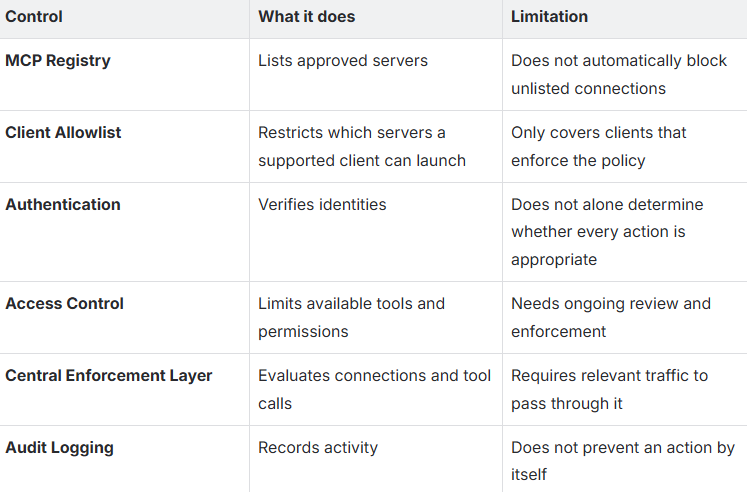
The objective should be to combine discovery, approval and enforcement rather than relying on a single registry.
This is exactly why we built the Fluid AI MCP Registry. Not just as a catalogue of approved servers, but as a governed layer. Every server in our registry is vetted, verified, OAuth 2.0 secured, and audit-logged. But we also learned that a registry is only the starting point. What matters is what happens when an agent tries to connect to something outside the registry. Does the platform block it? Log it? Alert someone? Or just let it through? That enforcement layer is the difference between governance on paper and governance in production.
How Enterprises Can Discover MCP Servers Outside the Registry
Before an organisation can govern its MCP environment, it needs to understand what is already running.
A useful first step is to compare approved registry entries with actual MCP configurations and connections.
Here are four places to investigate.
Step 1: Review Developer Configuration Files
Inspect MCP configuration files across managed developer devices and AI applications.
Look for:
Server names and commands.
Local executable paths.
Remote server URLs.
Environment variables.
Configured authentication details.
The objective is to identify connections that are not part of the approved catalogue.
Step 2: Review Installed Extensions
Check IDE extensions and other developer tools that can register or launch MCP servers.
Identify which extensions introduce additional connections and whether those connections have been reviewed.
Step 3: Inspect Application Code and Pipelines
Search application repositories, notebooks and automated workflows for MCP SDK usage, server configurations and hardcoded endpoints.
This is particularly important for agents that run outside developer desktops.
Step 4: Review Network Activity
Where appropriate, examine DNS, network egress and application logs to identify connections to known or suspected MCP endpoints.
Compare these findings with the organisation’s approved server inventory.
Important: Discovery should begin with read-only inspection wherever possible. The first objective is to understand the environment without unexpectedly interrupting existing workflows.
An inventory is only a starting point. Enterprises also need a process to review new connections as they are introduced.
A Practical Framework for Governing MCP Servers
Once an organisation understands its MCP environment, it needs a repeatable governance process.
The following six steps provide a practical starting point.
Step 1: Create a Central MCP Inventory
Maintain a record of every identified MCP server.
Include:
Server name and endpoint.
Business purpose.
Technical owner.
Hosting environment.
Connected applications.
Available tools.
Authentication method.
Approval status.
This gives security and IT teams a common view of the MCP environment.
Step 2: Establish an Approval Process
Every new MCP server should go through a defined review before production use.
The review should consider:
Who developed or maintains the server?
What systems does it access?
What information can it retrieve?
Can it modify enterprise data?
What authentication does it use?
Has its code and dependencies been reviewed?
Internal servers should have a clear approval path rather than being automatically rejected because they are not publicly listed.
Step 3: Apply Least-Privilege Access
An AI agent should only receive the access needed to complete its assigned task.
For example, an agent designed to retrieve customer account information may not need permission to modify account details.
Access should be based on the agent’s identity, business purpose and required operations.
Where possible, separate read and write permissions and restrict sensitive operations.
Step 4: Enforce Approved Connections
Use client-level allowlists and deny lists wherever supported.
For environments that require broader coverage, consider routing MCP traffic through a controlled gateway or enforcement layer.
This allows the organisation to evaluate whether a connection or tool call should be permitted instead of relying only on the server’s presence in a catalogue.
The enforcement approach must account for developer tools, backend services and automated pipelines, not just desktop AI clients.
In our deployments with banks and government institutions, we route every MCP connection through a controlled gateway. If an agent tries to reach a server that’s not in the approved registry, the connection doesn’t just fail silently. It gets logged, flagged, and routed to the security team. That’s not paranoia. That’s what a CISO at a national-scale institution expects before saying yes.
Step 5: Monitor Tool Calls and Changes
Monitoring should go beyond checking whether a server is connected.
Enterprises should maintain visibility into:
Agent identity.
MCP server identity.
Tool invoked.
Requested operation.
Access decision.
Relevant timestamps.
Outcome of the request.
Sensitive information should be handled carefully in logs, with appropriate retention and access policies.
Changes to server versions, tools, permissions and endpoints should also trigger reviews.
Step 6: Establish Ownership and Regular Reviews
Every MCP server should have a responsible owner.
That owner should ensure that:
The server is still required.
Its permissions remain appropriate.
Dependencies are maintained.
Security issues are addressed.
Changes are reviewed.
Unused servers are retired.
Governance should be an ongoing process rather than a one-time approval exercise.
How Fluid AI Approaches MCP Governance
At Fluid AI, we built MCP-native from day one. Our platform includes the Fluid AI MCP Registry (http://fluidmcp.com ): a vetted, verified ecosystem of MCP packages across six categories.
Internal Databases: PostgreSQL, MongoDB, MySQL, Snowflake, DB2/AS400, vector stores
Third-Party APIs: CRM, ERP, accounting, project management
Document Repositories: Internal knowledge bases, compliance docs
Enterprise Systems: Core banking, LOS, claims, KYC
Voice & Communications: Telephony, WhatsApp, email
Custom Connectors: Build your own in any language
1000+ pre-built MCP servers. Each one OAuth 2.0 secured, audit-logged, and deployable on-premise or fully air-gapped.
Every MCP call on our platform ships with built-in guarantees:
Secured: OAuth 2.0, mutual TLS, encrypted in transit and at rest.
Audited: Every call logged with request, response, latency, and identity.
Versioned: Schema evolution without breakage, backwards compatible.
Sovereign: Runs on-prem, air-gapped, or in your VPC. Zero exfiltration.
The result: the six-month integration cycle most enterprises deal with becomes a two-week implementation. No custom integration code. No bespoke auth flows. No fragmented audit logs.
One protocol. Every system.
Explore the Fluid AI MCP Registry → http://fluidmcp.com Learn how Fluid AI handles MCP for enterprises → http://fluid.ai/solutions/mcp
What Should a Secure Enterprise MCP Architecture Look Like?
A secure MCP architecture should combine standardised connectivity with controlled access.
Consider an enterprise where AI agents need to interact with a CRM, ERP system, internal knowledge base and customer database.
A governed architecture could follow this structure:
AI agents: Initiate requests based on their assigned business workflows.
MCP clients: Establish communication with the required MCP servers.
Approved MCP catalogue: Maintains the organisation’s recognised servers and ownership information.
Identity and access controls: Verify the agent’s identity and determine its permissions.
Enforcement layer: Evaluates the requested connection or tool call against organisational policies.
Enterprise systems: Receive only authorised requests.
Monitoring and audit: Record relevant decisions and activity.
The architecture should ensure that access decisions are not based solely on whether a server appears in a registry.
They should also consider:
Which agent is making the request?
Which server is receiving it?
Which tool is being invoked?
What permissions does the agent have?
Does the requested action comply with enterprise policy?
For sensitive operations, organisations may also require additional approval or human review.
This is particularly important in banking, insurance, government and other environments where unauthorised access or changes can have significant consequences.
MCP Governance Is Part of the Larger Enterprise AI Security Problem
MCP governance should not be treated as a separate technical exercise.
It is connected to a broader challenge: maintaining control over AI agents as they gain access to more enterprise systems.
An organisation may have multiple agents working across departments.
One retrieves information from internal documents. Another interacts with a CRM. A third supports financial operations.
Each agent may have different permissions, owners, tools and access requirements.
As these deployments expand, organisations need answers to three fundamental questions:
Visibility: Do we know which agents, servers and integrations are operating across our environment?
Control: Can we determine what each agent is allowed to access and which actions it can perform?
Accountability: Can we trace an action back to the agent, identity, tool and policy decision involved?
These questions apply beyond MCP.
They are part of building enterprise AI systems that are secure, manageable and ready for production.
Conclusion: Make Every AI Connection Accountable
MCP is making it easier for AI applications to connect with external tools, databases and enterprise systems.
That creates new opportunities for automation and more capable AI agents.
But easier connectivity also means enterprises need better visibility into the connections being created.
An approved registry is a useful starting point. It helps organisations identify recognised servers and establish a controlled catalogue.
However, effective governance requires more.
Enterprises need to discover existing connections, review server security, assign ownership, apply least-privilege access, enforce policies and maintain audit trails.
The goal is not to prevent developers from building useful integrations.
It is to make sure every connection has a clear purpose, appropriate permissions and accountable ownership.
We’ve spent 14+ years building AI for regulated enterprises. Banks, insurers, government institutions. The lesson that keeps repeating itself across every deployment is this: the AI is never the hard part. The governance around it is. MCP makes connectivity easier. But easier connectivity without governance is just faster risk. Make every connection accountable. That’s the only way enterprise AI earns trust.
Frequently Asked Questions (FAQs)
1. What is an MCP server?
An MCP server is a component that exposes tools, resources or prompts to AI applications through the Model Context Protocol. It allows AI applications to interact with external services and data sources through a standardised interface.
2. What are MCP servers outside the registry?
These are MCP servers that AI applications connect to without the servers appearing in an organisation’s approved catalogue. They may be introduced through local configuration files, extensions, remote URLs or application code.
3. Are unregistered MCP servers always unsafe?
No. Internal development servers, private enterprise integrations and testing environments may legitimately operate outside public registries. The concern is whether they have been reviewed, documented, assigned an owner and placed under appropriate security controls.
4. What are the main security risks of unmanaged MCP servers?
Common risks include unverified code, excessive permissions, weak authentication, credential exposure, missing audit trails and uncontrolled configuration changes.
5. Is an MCP registry enough to secure enterprise AI agents?
No. A registry helps organisations maintain a catalogue of approved servers, but it does not automatically enforce every connection or tool call. Enterprises need additional access controls, client enforcement, monitoring and governance processes.
6. How can enterprises discover unapproved MCP servers?
They can review developer configuration files, installed extensions, application repositories, automated pipelines and relevant network activity. Findings should be compared with the organisation’s approved MCP inventory.
Explore Fluid AI’s MCP Registry → http://fluidmcp.com
Learn how Fluid AI handles MCP for enterprises → http://fluid.ai/solutions/mcp
Read more about enterprise AI security → http://fluid.ai/blogs/enterprise-guide-to-ai-agent-security
Book your Free Strategic Call to Advance Your Business with Generative AI!
Fluid AI is an AI company based in Mumbai. We help organisations kickstart their AI journey. If you're seeking a solution for your organisation to enhance customer support, boost employee productivity and make the most of your organisation's data, look no further.
Take the first step on this exciting journey by booking a Free Discovery Call with us today and let us help you make your organisation future-ready and unlock the full potential of AI for your organisation.